
1 What is Redis
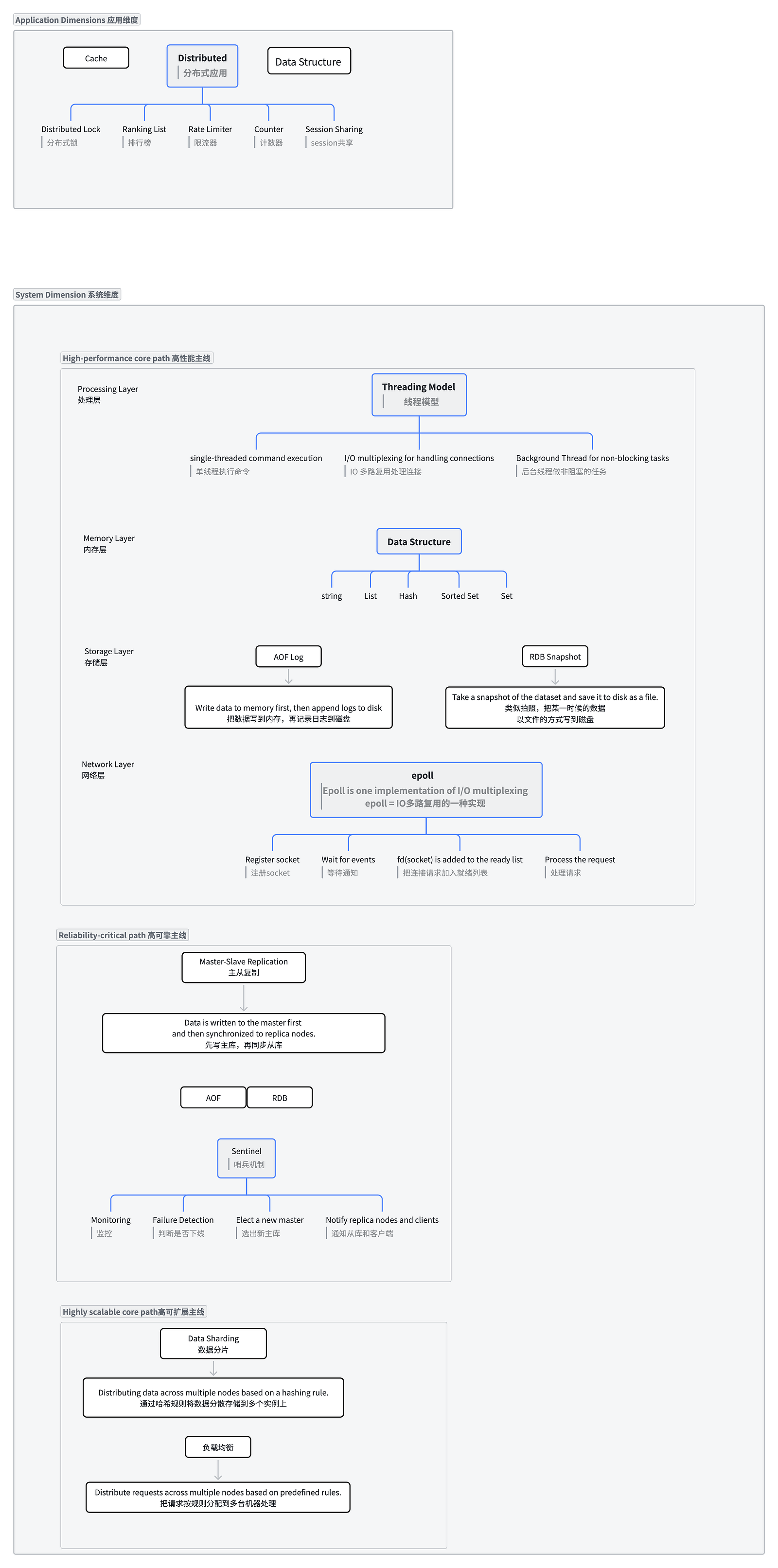
Redis is a key-value database. Keys are of type string, while values can be of the following types: string, list, set, sorted set (ZSet), hash, bitmap, and others.
2 Redis Data Types and Use Cases
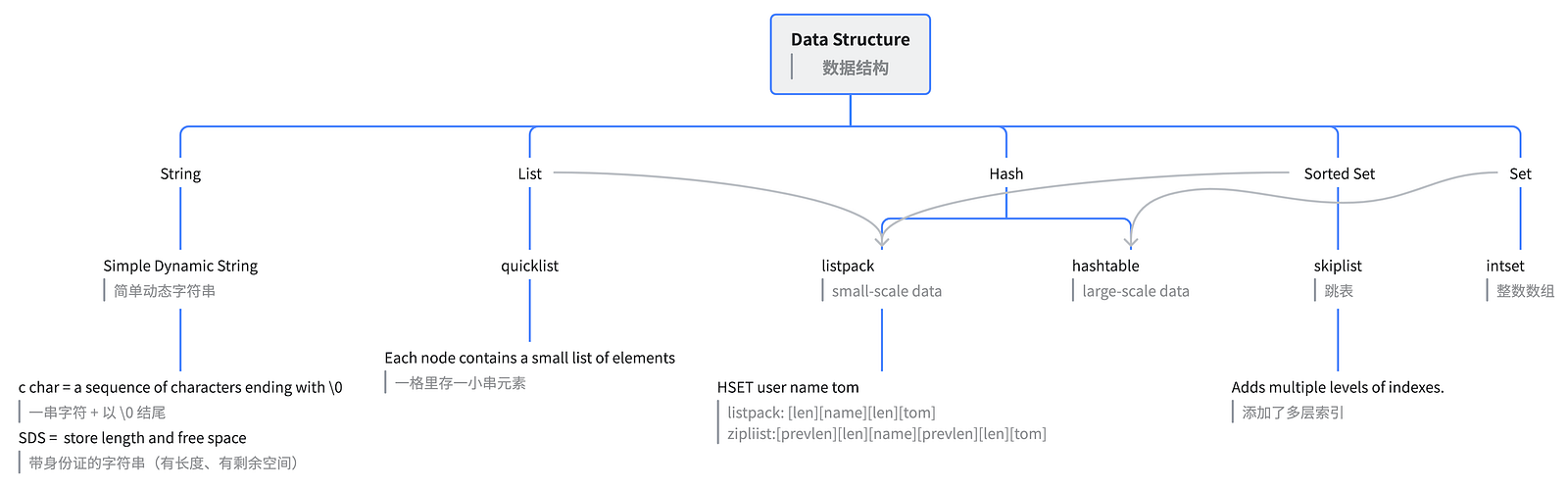
Redis uses compact structures for small datasets (listpack/intset) and fast structures for large datasets (hashtable/skiplist/quicklist).
Small datasets → optimize memory usage 省内存
Large datasets → maintain high performance 保性能
2.1 String
2.1.1 Common Commands
https://redis.io/docs/latest/develop/data-types/strings/?utm_source=chatgpt.com
> SET total_crashes 0
OK
> INCR total_crashes
(integer) 1
> INCRBY total_crashes 10
(integer) 11
> SET bike:1 bike NX
(nil)
> SET bike:1 bike XX
OK
> MSET bike:1 "Deimos" bike:2 "Ares" bike:3 "Vanth"
OK
> MGET bike:1 bike:2 bike:3
1) "Deimos"
2) "Ares"
3) "Vanth"
> SET total_crashes 0
OK
> INCR total_crashes
(integer) 1
> INCRBY total_crashes 10
(integer) 11
2.1.2 Data Structure
Official documentation:
code: https://github.com/redis/redis/blob/unstable/src/sds.h
Redis Strings are implemented using SDS (Simple Dynamic String). While the official SDS documentation describes the original sdshdr design, modern Redis uses multiple header types (sdshdr5, sdshdr8, sdshdr16, sdshdr32, and sdshdr64) and automatically selects the most suitable one based on string length to reduce memory overhead.
Redis String 底层基于 SDS(Simple Dynamic String)实现。官方 SDS 文档主要介绍了早期的 sdshdr 结构,而当前 Redis 版本已经演进为 sdshdr5、sdshdr8、sdshdr16、sdshdr32 和 sdshdr64 等多种 Header,根据字符串长度自动选择最合适的存储结构,以减少内存开销。
// Old SDS header structure (Redis early versions)
struct sdshdr {
    long len;
    long free;
    char buf[];
};

/* Note: sdshdr5 is never used, we just access the flags byte directly.
 * However is here to document the layout of type 5 SDS strings. */
struct __attribute__ ((__packed__)) sdshdr5 {
    unsigned char flags; /* 3 lsb of type, and 5 msb of string length */
    char buf[];
};
struct __attribute__ ((__packed__)) sdshdr8 {
    uint8_t len; /* used */
    uint8_t alloc; /* excluding the header and null terminator */
    unsigned char flags; /* 3 lsb of type, 5 unused bits */
    char buf[];
};
...
2.1.3 Use Cases
Use Case 1: Fast Mapping from Photo ID to Object Storage ID
In an image storage system, the business system usually has a photo ID, while the actual file is stored in an object storage service such as S3, OSS, MinIO, or an internal file system.
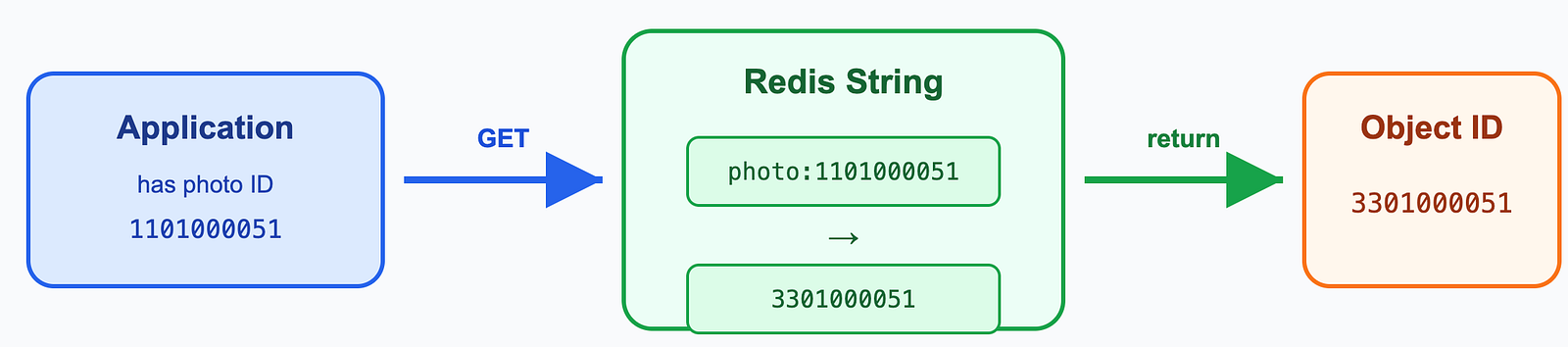
SET photo:1101000051 3301000051
GET photo:1101000051
Use Case 2: Counters, Such as Views, Likes, and Failure Counts
Redis String supports atomic increment commands such as INCR and INCRBY, which makes it very useful for high-concurrency counters.
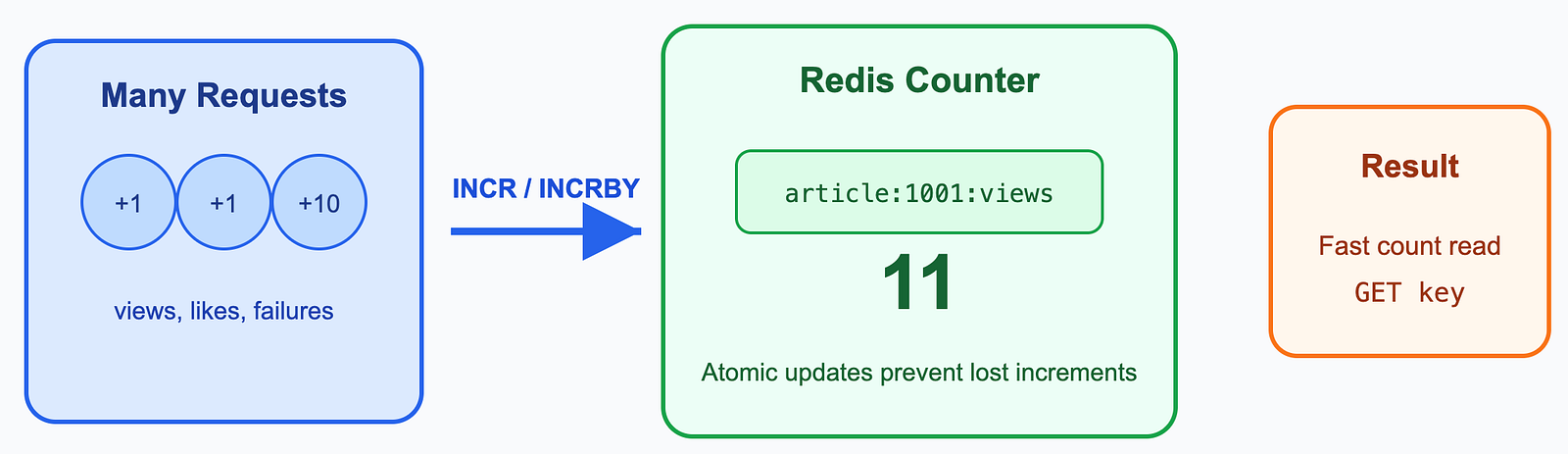
SET article:1001:views 0
INCR article:1001:views
INCRBY article:1001:views 10
GET article:1001:views
Use Case 3: Distributed Lock
Redis String can also be used for a basic distributed lock. The key command is SET key value NX EX seconds.
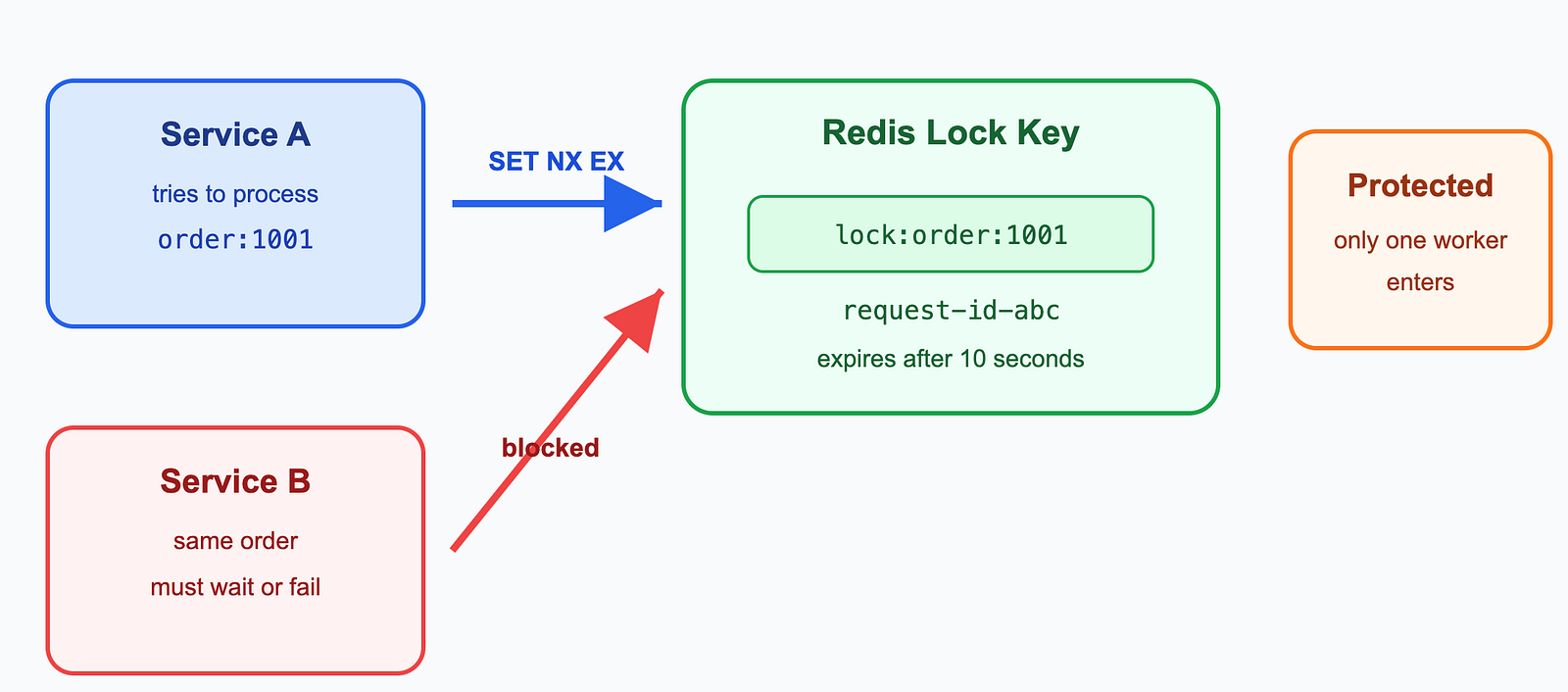
Meaning:
- NX: set the key only if it does not already exist.
- EX 10: expire after 10 seconds to avoid deadlocks.
- value: usually stores a request ID so the application can verify ownership before releasing the lock.
2.2 List
Redis lists store ordered elements and are frequently used to implement stacks and queues.
2.2.1 Common Commands
Treat a list like a queue (first in, first out):
> LPUSH bikes:repairs bike:1
(integer) 1
> LPUSH bikes:repairs bike:2
(integer) 2
> LPOP bikes:repairs
"bike:2"
> LPOP bikes:repairs
"bike:1"
Treat a list like a stack (first in, last out):
> LPUSH bikes:repairs bike:1
(integer) 1
> LPUSH bikes:repairs bike:2
(integer) 2
> LPOP bikes:repairs
"bike:2"
> LPOP bikes:repairs
"bike:1"
2.2.2 Data Structure
https://github.com/redis/redis/blob/unstable/src/quicklist.h
Redis Lists are implemented using QuickList.
A QuickList is a doubly linked list, but instead of storing a single element in each node, each node stores a ListPack. It uses a linked list for fast insertions and deletions, and ListPack to save memory.
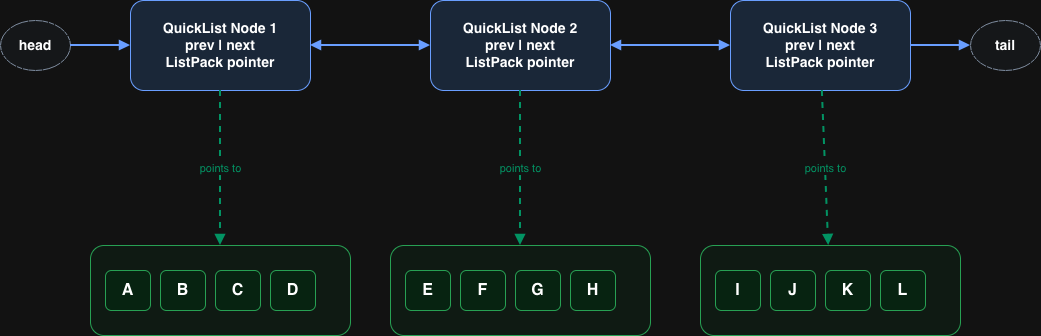
/* quicklistNode is a 32 byte struct describing a listpack for a quicklist.
 * We use bit fields keep the quicklistNode at 32 bytes.
 * count: 16 bits, max 65536 (max lp bytes is 65k, so max count actually < 32k).
 * encoding: 2 bits, RAW=1, LZF=2.
 * container: 2 bits, PLAIN=1 (a single item as char array), PACKED=2 (listpack with multiple items).
 * recompress: 1 bit, bool, true if node is temporary decompressed for usage.
 * attempted_compress: 1 bit, boolean, used for verifying during testing.
 * dont_compress: 1 bit, boolean, used for preventing compression of entry.
 * extra: 9 bits, free for future use; pads out the remainder of 32 bits */
typedef struct quicklistNode {
    struct quicklistNode *prev;
    struct quicklistNode *next;
    unsigned char *entry; /*The entry pointer points to the beginning of a ListPack.*/
    size_t sz;             /* entry size in bytes */
    unsigned int count : 16;     /* count of items in listpack */
    unsigned int encoding : 2;   /* RAW==1 or LZF==2 */
    unsigned int container : 2;  /* PLAIN==1 or PACKED==2 */
    unsigned int recompress : 1; /* was this node previous compressed? */
    unsigned int attempted_compress : 1; /* node can't compress; too small */
    unsigned int dont_compress : 1; /* prevent compression of entry that will be used later */
    unsigned int extra : 9; /* more bits to steal for future usage */
} quicklistNode;

typedef struct quicklist {
    quicklistNode *head;
    quicklistNode *tail;
    unsigned long count;        /* total count of all entries in all listpacks */
    unsigned long len;          /* number of quicklistNodes */
    size_t alloc_size;          /* total allocated memory (in bytes) */
    signed int fill : QL_FILL_BITS;       /* fill factor for individual nodes */
    unsigned int compress : QL_COMP_BITS; /* depth of end nodes not to compress;0=off */
    unsigned int bookmark_count: QL_BM_BITS;
    quicklistBookmark bookmarks[];
} quicklist;
2.2.3 Use Cases
Use Case 1: Latest Comments
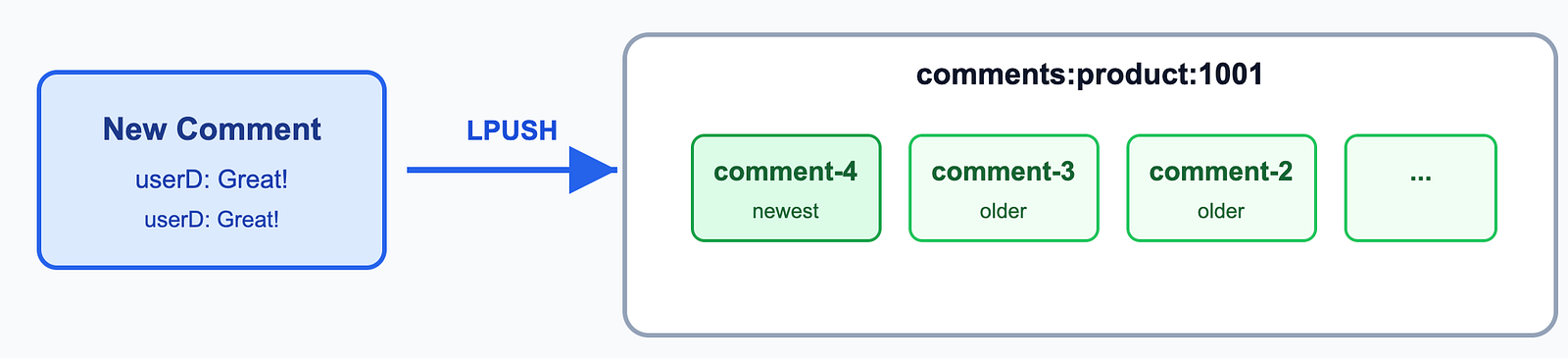
Use Case 2: Simple Task Queue
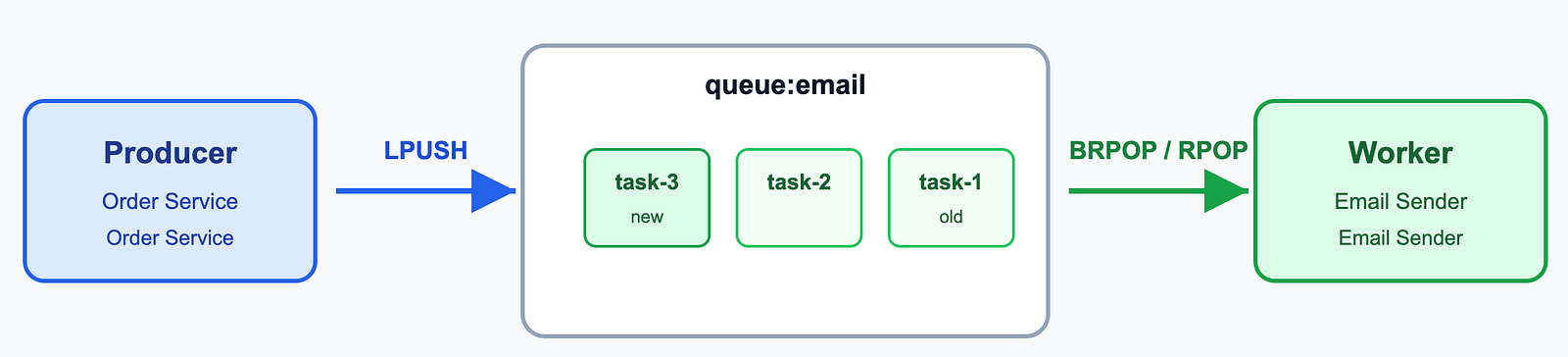
2.3 Set
A Redis set is an unordered collection of unique strings (members). Internally, it uses a hash table, providing O(1) time complexity for add, remove, and lookup operations.
2.3.1 Common Commands
> SADD k1 v1
(integer) 1
> SDIFF k1 k2
1) "v1"
2) "v2"
> SISMEMBER k1 v1 /*Checks whether a single element exists in a Set.*/
(integer) 1
> SMISMEMBER k1 v2 v3 v4/*Checks whether multiple elements exist in a Set at once.*/
1) (integer) 1
2) (integer) 1
3) (integer) 0
2.3.2 Data Structure
https://redis.io/docs/latest/commands/object-encoding/?utm_source=chatgpt.com
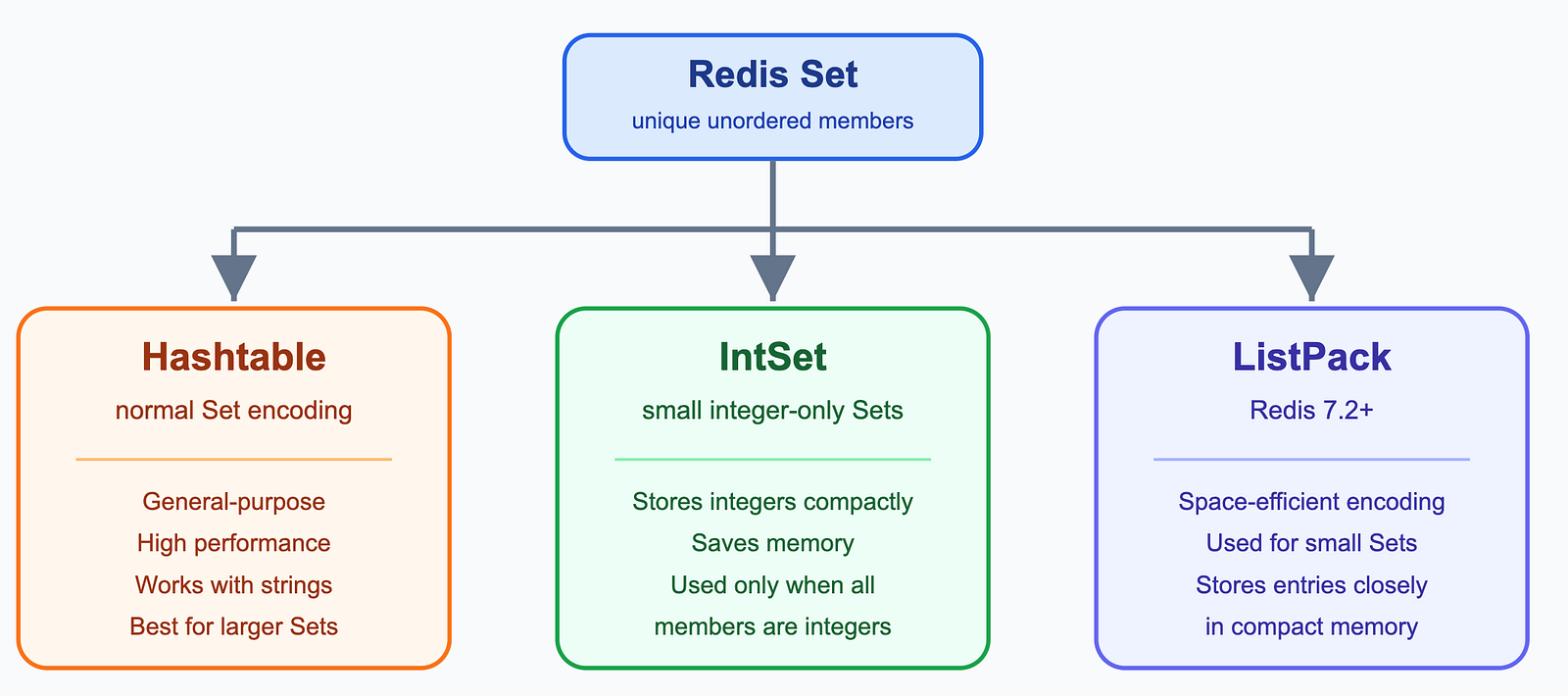
Sets can be encoded as:
hashtable, normal set encoding.intset, a special encoding used for small sets composed solely of integers.listpack, Redis >= 7.2, a space-efficient encoding used for small sets.
2.3.3 Use Cases
Use Case 1: Article Likes Without Duplicates
Redis Set is a good fit for likes because each user should only like the same article once.
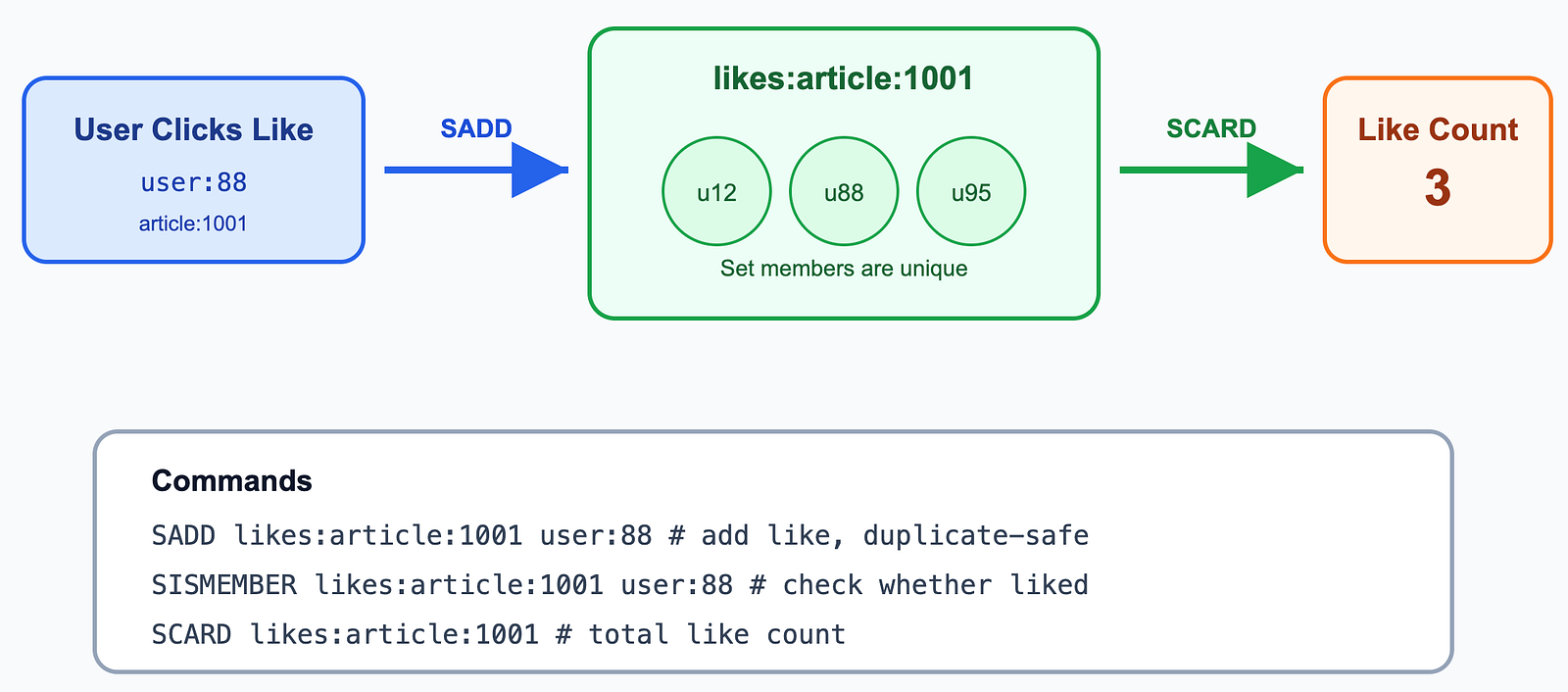
Use Case 2: Daily Active Users and Day-2 Retention
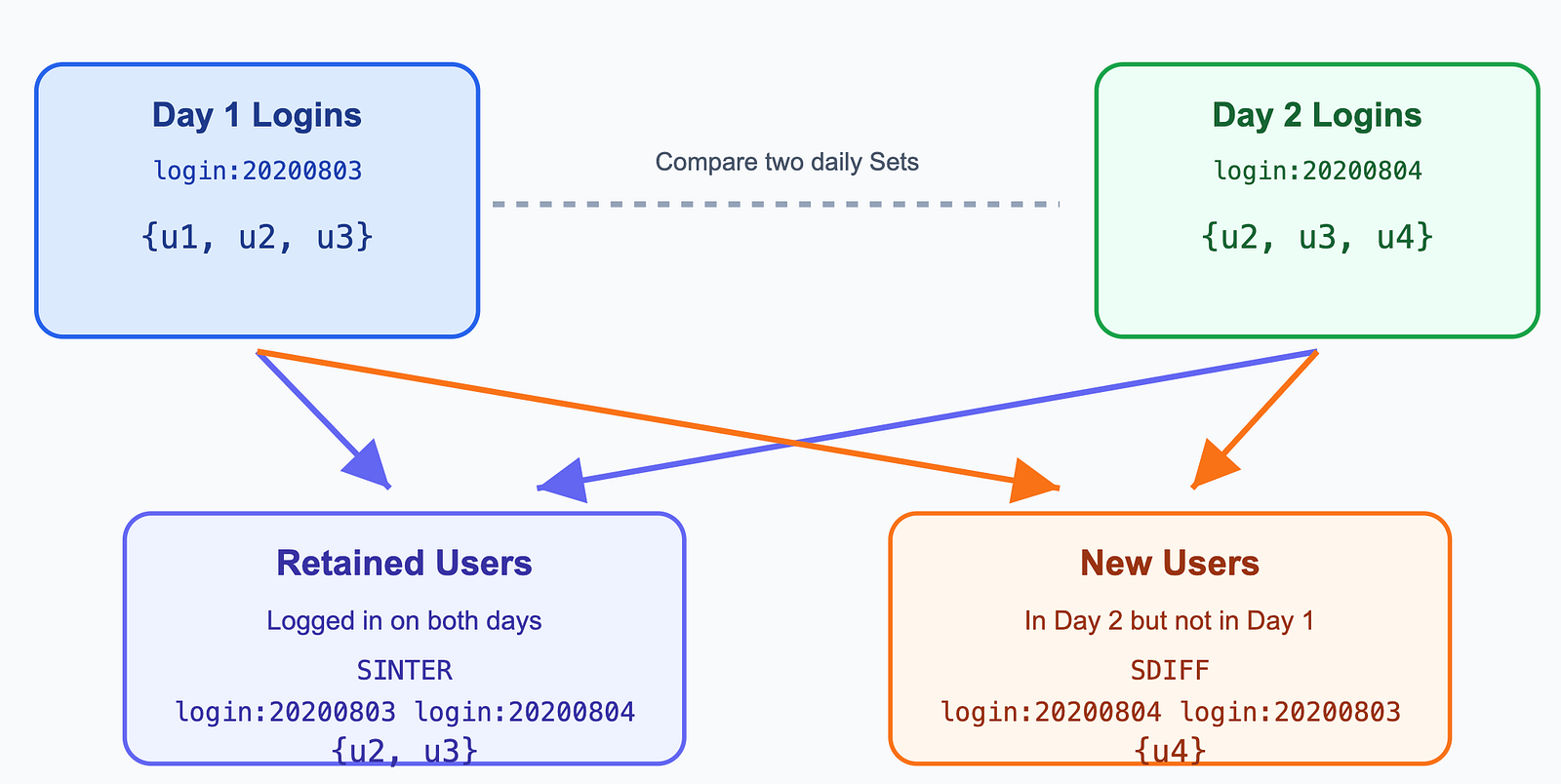
2.4 Sorted Set
A Redis sorted set is a collection of unique strings (members) ordered by an associated score.
2.4.1 Common Commands
> ZADD racer_scores 10 "Norem"
(integer) 1
> ZRANGE racer_scores 0 -1
1) "Ford"
2) "Sam-Bodden"
3) "Norem"
> ZREVRANGE racer_scores 0 -1
1) "Norem"
2) "Sam-Bodden"
3) "Ford"
2.4.2 Data Structure
https://redis.io/docs/latest/commands/object-encoding/?utm_source=chatgpt.com
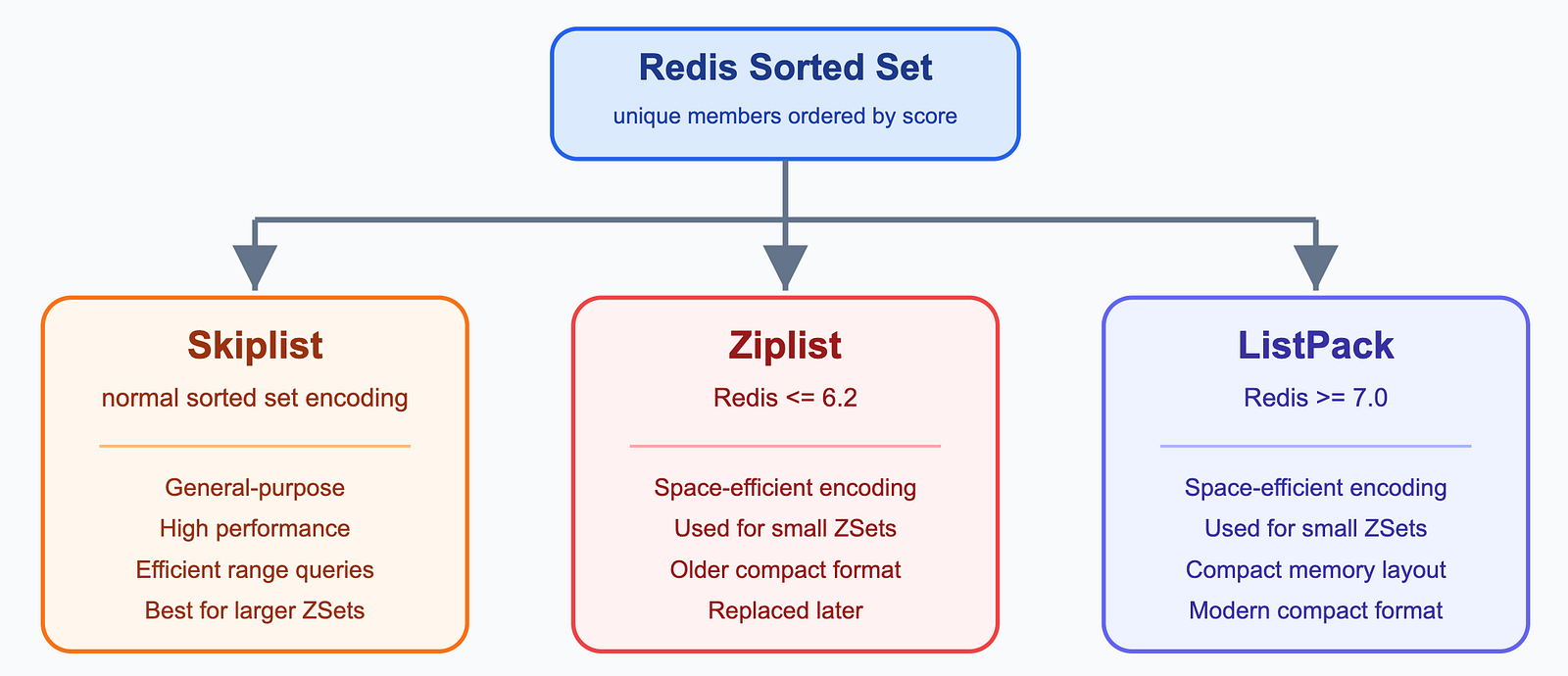
Sorted Sets can be encoded as:
skiplist, normal sorted set encoding.ziplist, Redis <= 6.2, a space-efficient encoding used for small sorted sets.listpack, Redis >= 7.0, a space-efficient encoding used for small sorted sets.
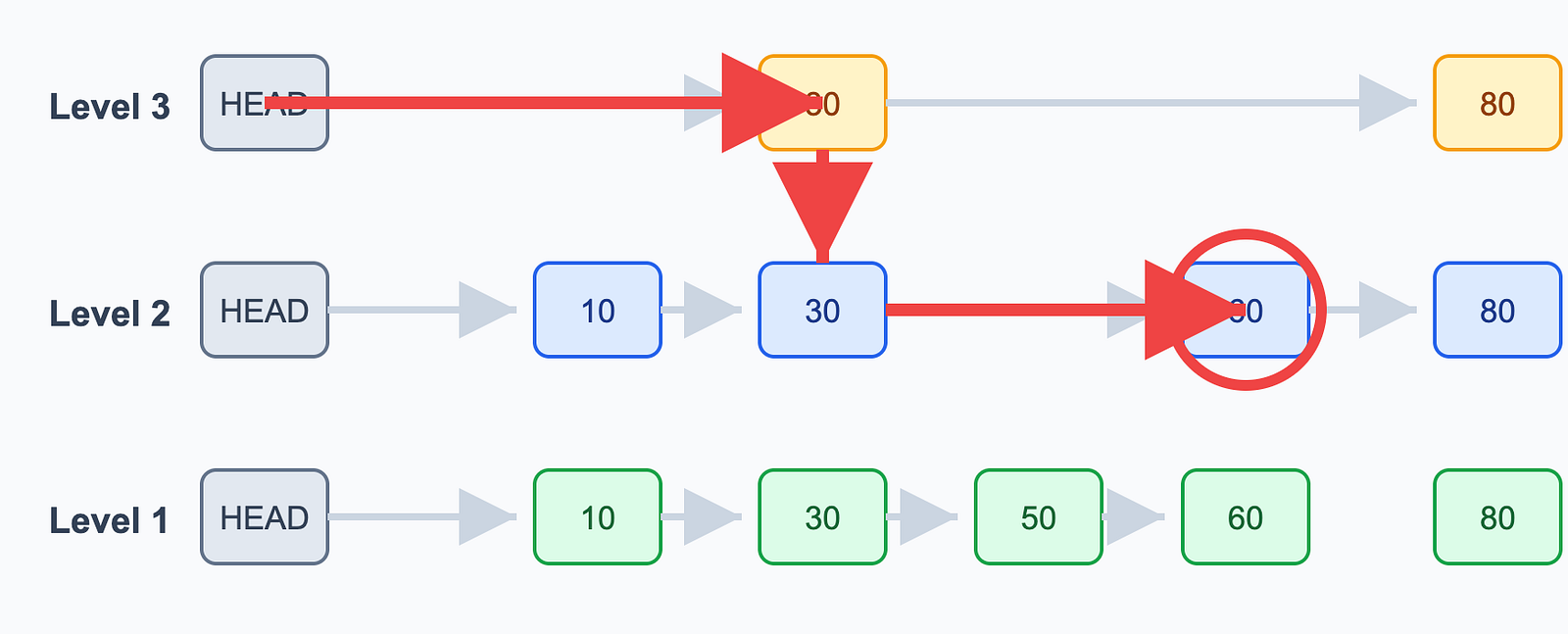
What is a Skiplist?
A Skiplist is a sorted linked list with multiple index levels. These indexes allow Redis to skip over many elements, making searches much faster.
For Example: Find 60
2.4.3 Use Cases
Use Case 1: Game Leaderboard
Redis Sorted Set is very suitable for leaderboards. The member is the player ID, and the score is the player’s game score.
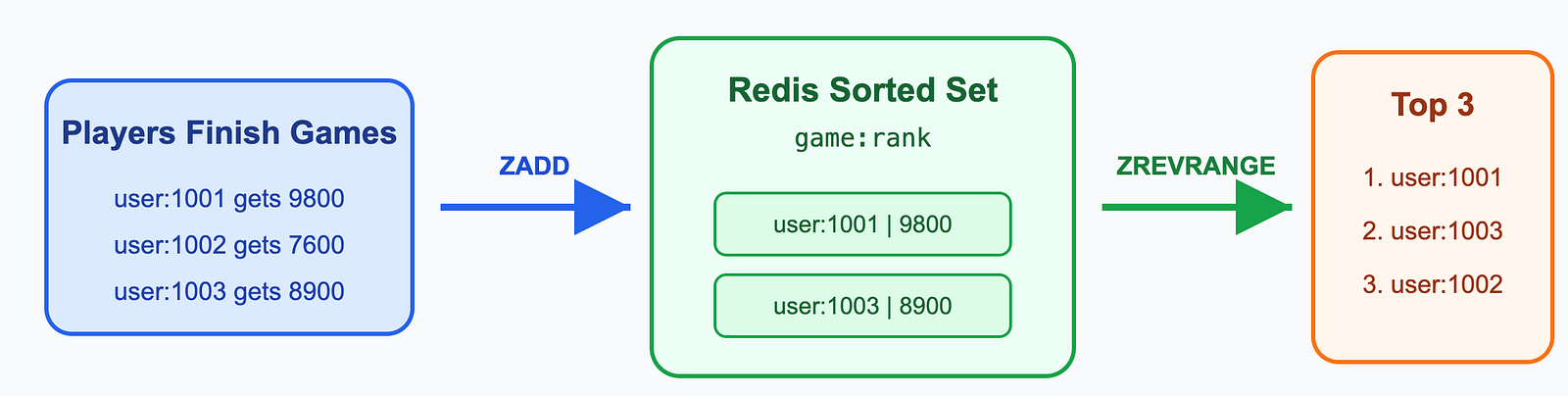
ZADD game:rank 9800 user:1001 7600 user:1002 8900 user:1003
ZREVRANGE game:rank 0 2 WITHSCORES
Use Case 2: Hot Search Ranking
Sorted Set can also be used for hot search keywords. The member is the keyword, and the score is the search count or popularity value.
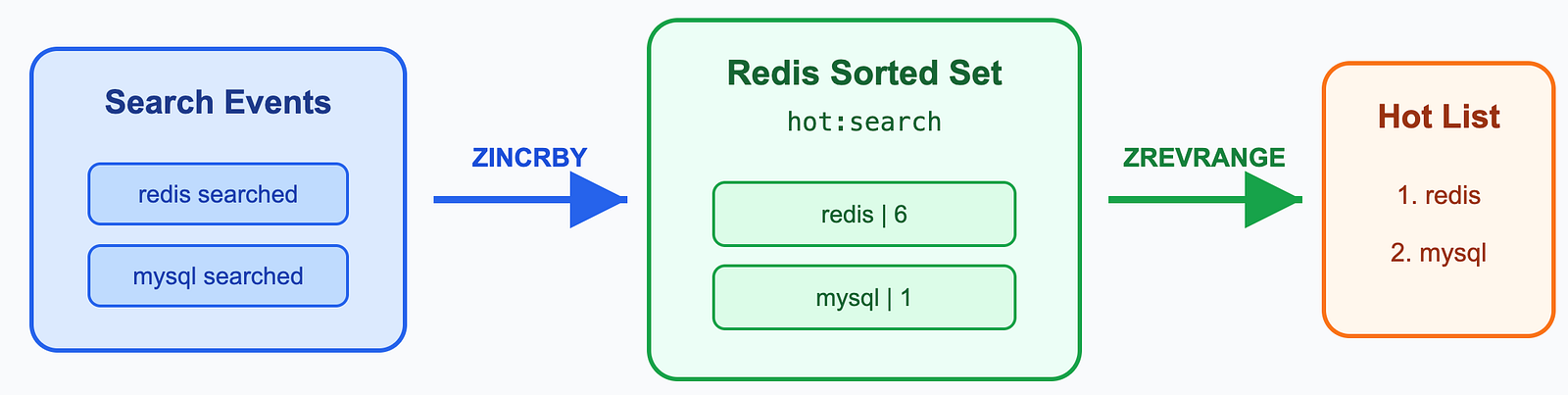
ZINCRBY hot:search 1 "redis"
ZINCRBY hot:search 5 "redis"
ZREVRANGE hot:search 0 9 WITHSCORES
2.5 Hash
A Redis Hash stores data as field-value pairs. It offers O(1) insert and lookup operations, but it cannot perform range queries.
2.5.1 Common Commands
HSET bike:1 model Deimos brand Ergonom type 'Enduro bikes' price 4972
(integer) 4
> HGET bike:1 model
"Deimos"
2.5.2 Data Structure
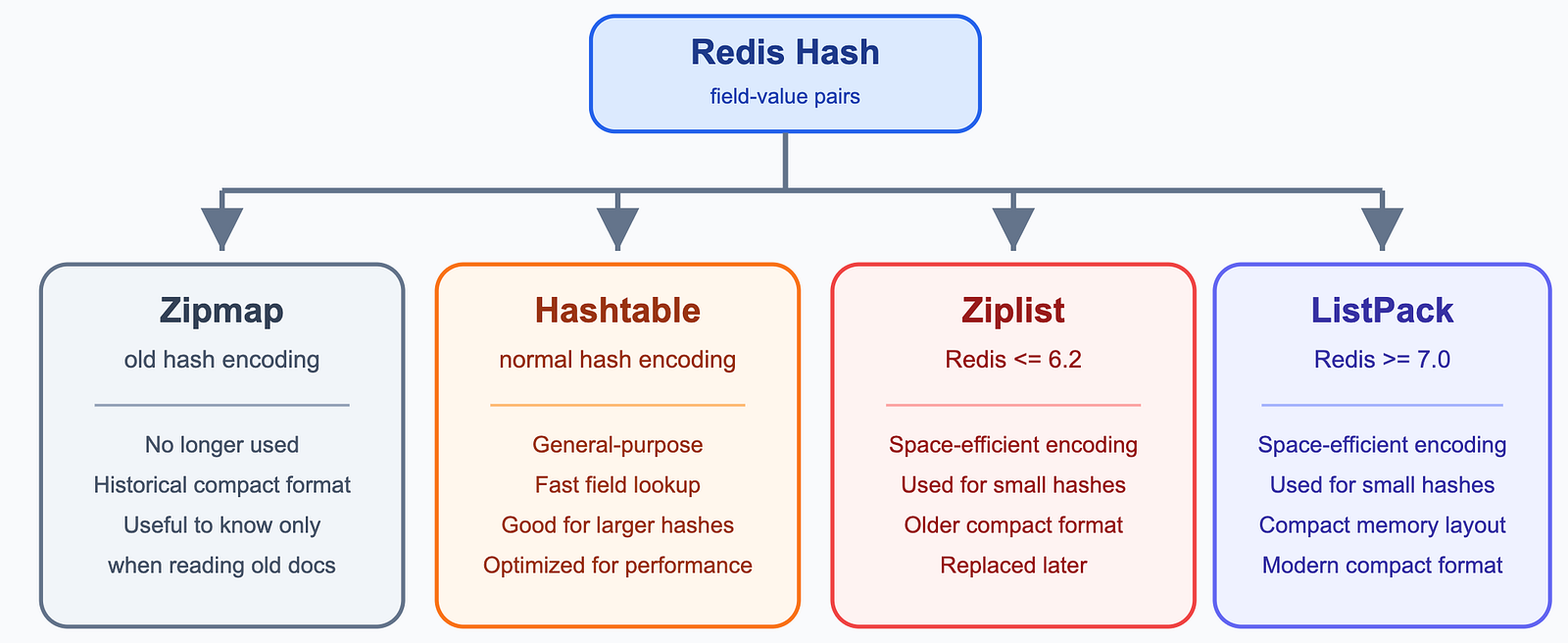
Hashes can be encoded as:
zipmap, no longer used, an old hash encoding.hashtable, normal hash encoding.ziplist, Redis <= 6.2, a space-efficient encoding used for small hashes.listpack, Redis >= 7.0, a space-efficient encoding used for small hashes.
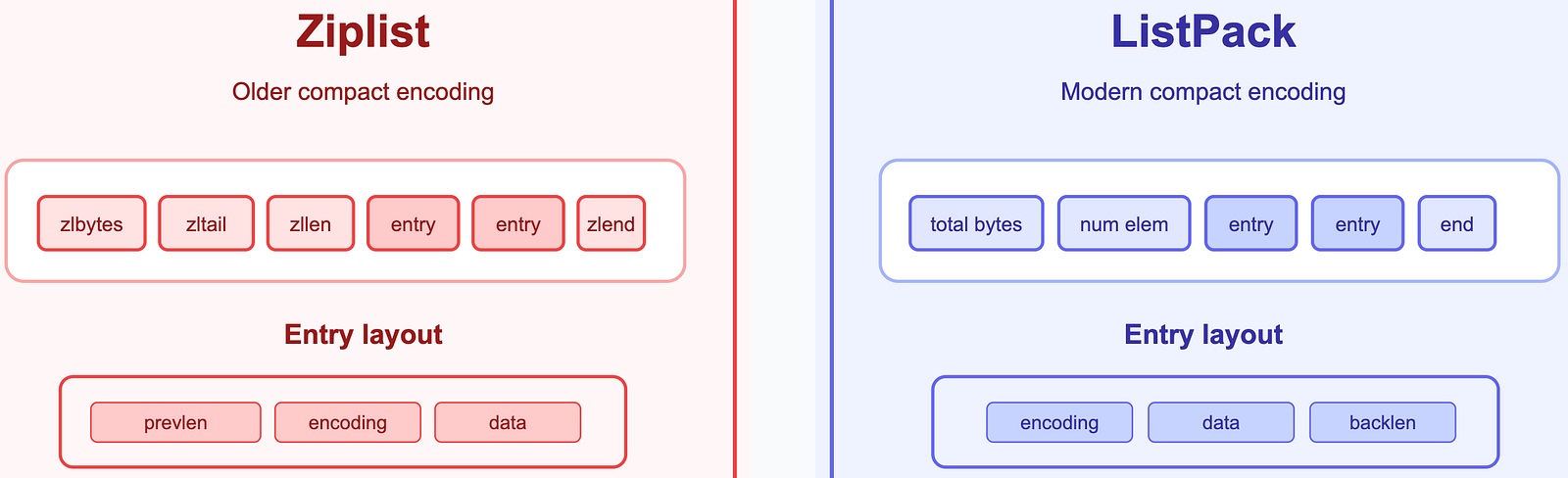
The defference between ziplist and listpack
Ziplist: next entry stores previous entry length
ListPack: each entry stores its own back length
2.5.3 Use Cases
Use Case 1: Store Object
The following data represents users and their account balances.
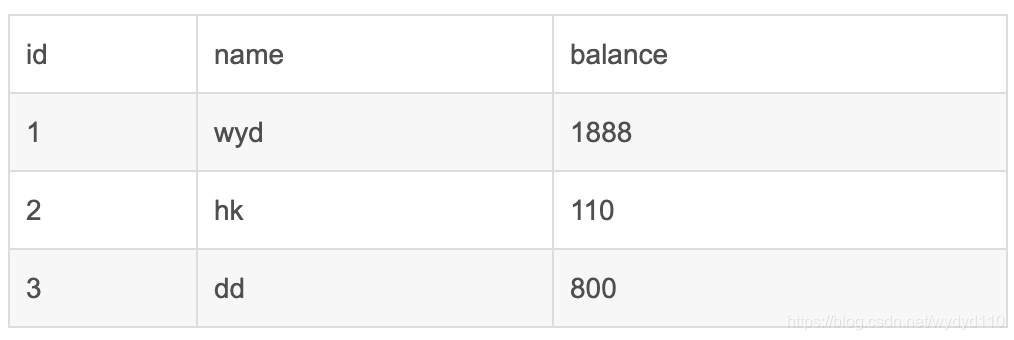
key = id,field1 = name,field2 = balance
hmset user:1 name wyd balance 1888
hmset user:2 name hk balance 110
hmset user:3 name dd balance 800
Use Case 2: Shopping Cart
Store each user’s shopping cart as a Redis Hash.
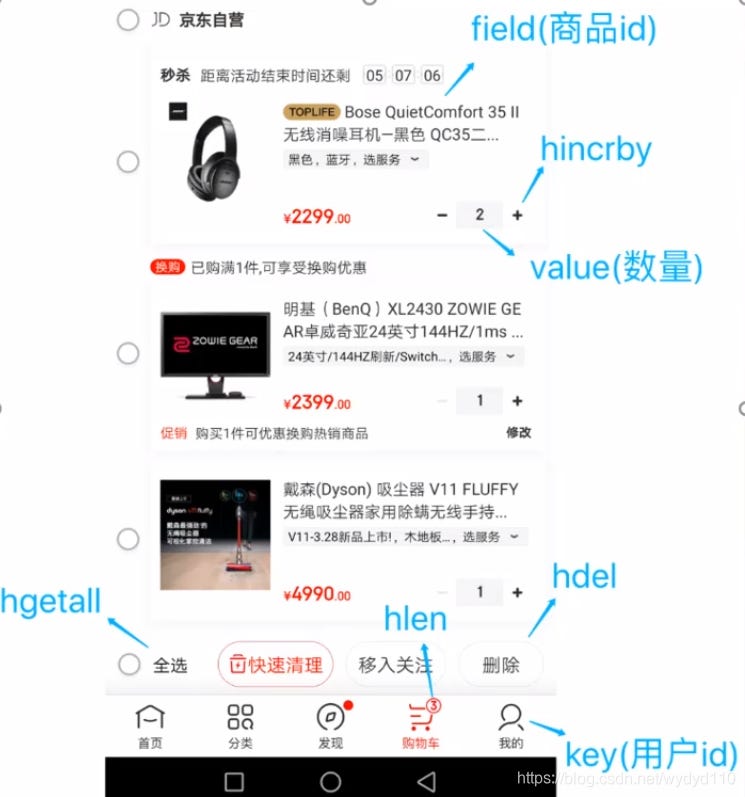
- Key = User ID (
cart:{userId}) - Field = Product ID (
skuId) - Value = Quantity
# Add a product
hset cart:userid skuid  1
# Increase the quantity
hincrby cart:userid skuid 1
# Get the total number of products
hlen cart:userid
# Remove a product
hdel cart:userid skuid
# Get all products in the cart
hgetall cart:userid
3 Redis I/O Model
3.1 Why Is Redis So Fast
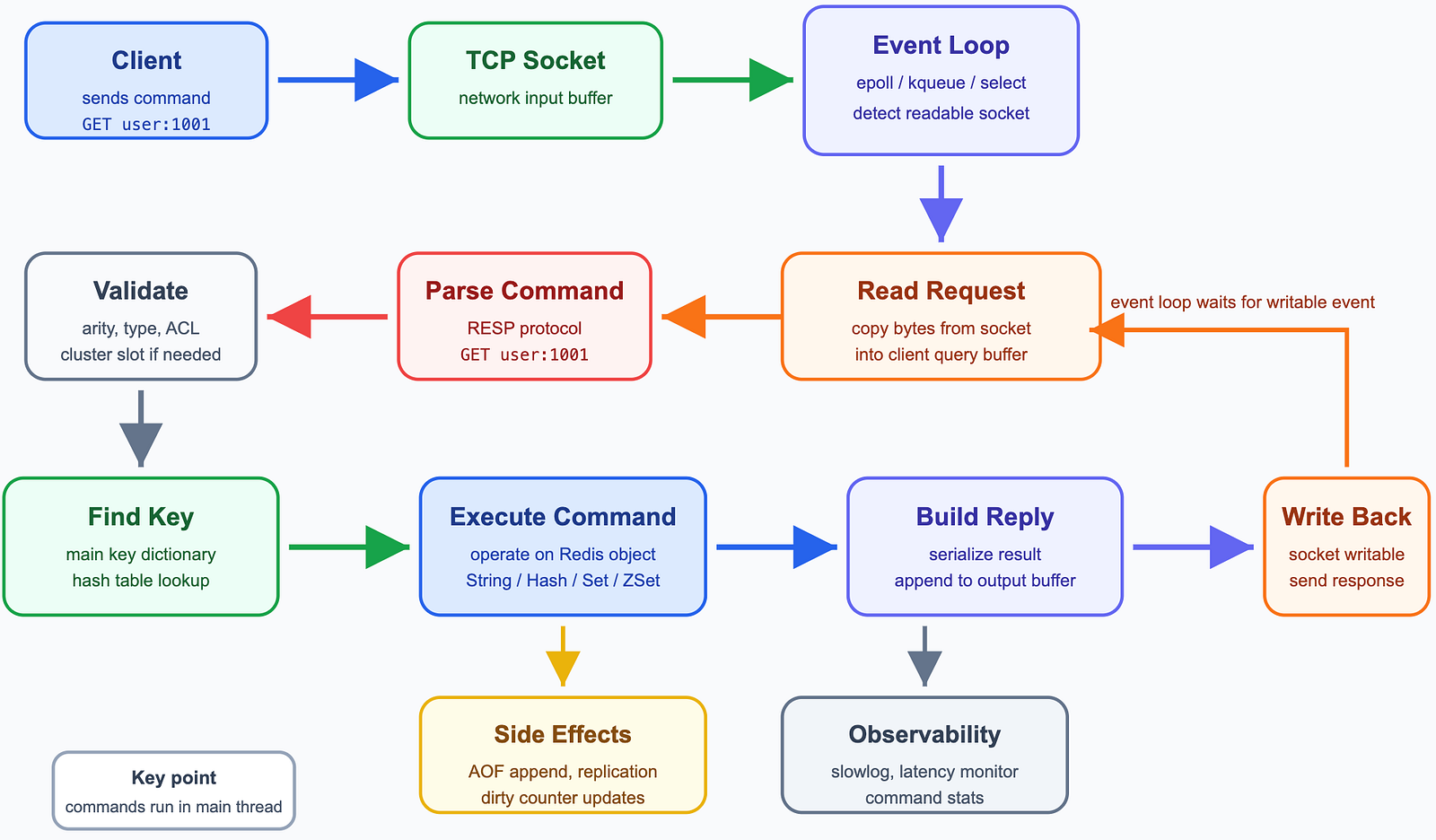
Redis is fast because it stores data in memory, uses efficient data structures, and processes client requests with an event-driven I/O model.
3.2 The Life of a Redis Request
3.3 Event Loop and I/O Multiplexing(多路复用)
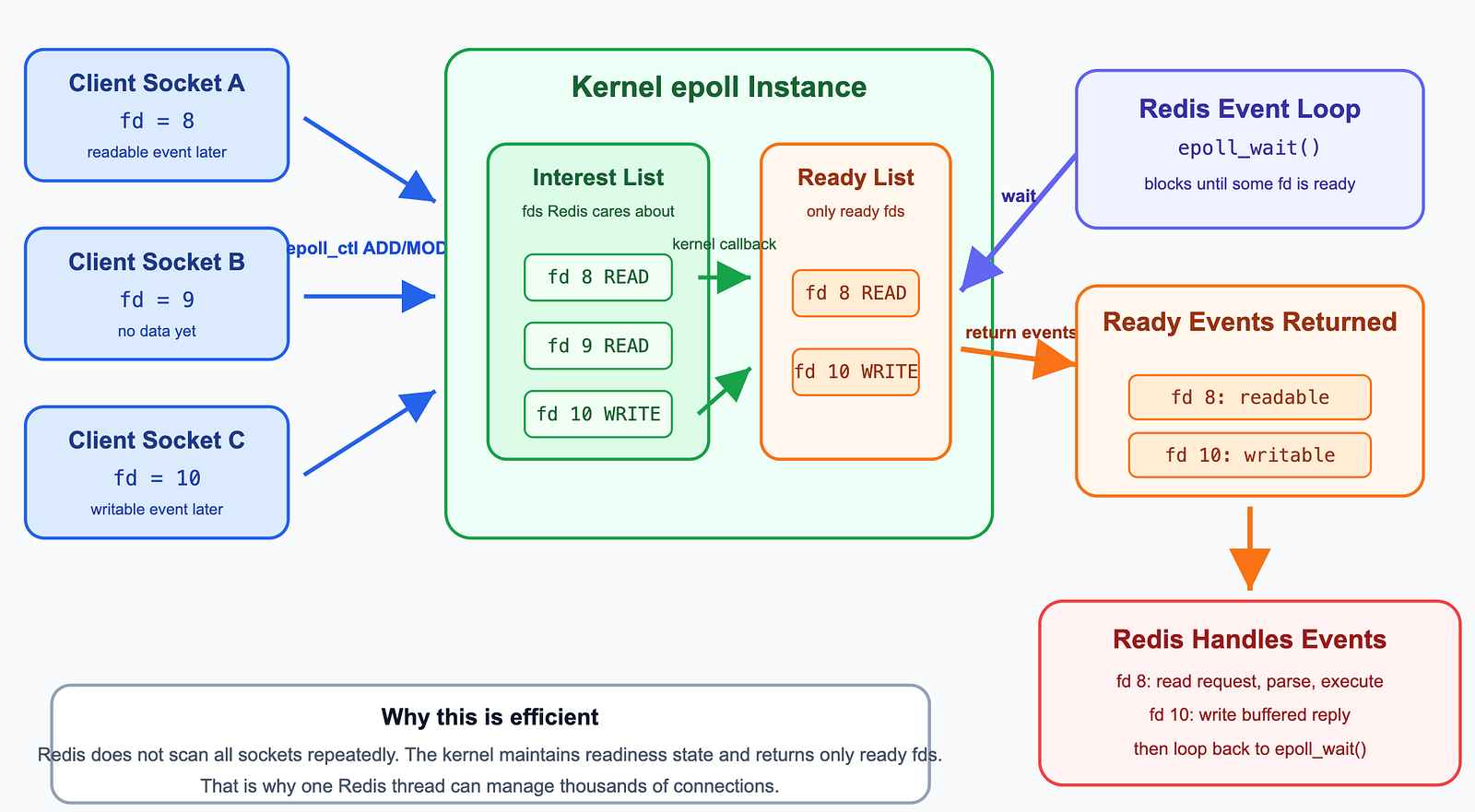
Redis does not create one thread for each client connection. Instead, it uses an event loop with I/O multiplexing.
The idea is simple:
One Redis thread asks the operating system: “Which sockets are ready now?”
On Linux, Redis commonly uses epoll for this. The Redis event loop continuously processes pending file events and time events.
3.3.1 I/O Multiplexing
I/O multiplexing allows one thread to monitor many sockets at the same time.
3.3.2 Event Loop
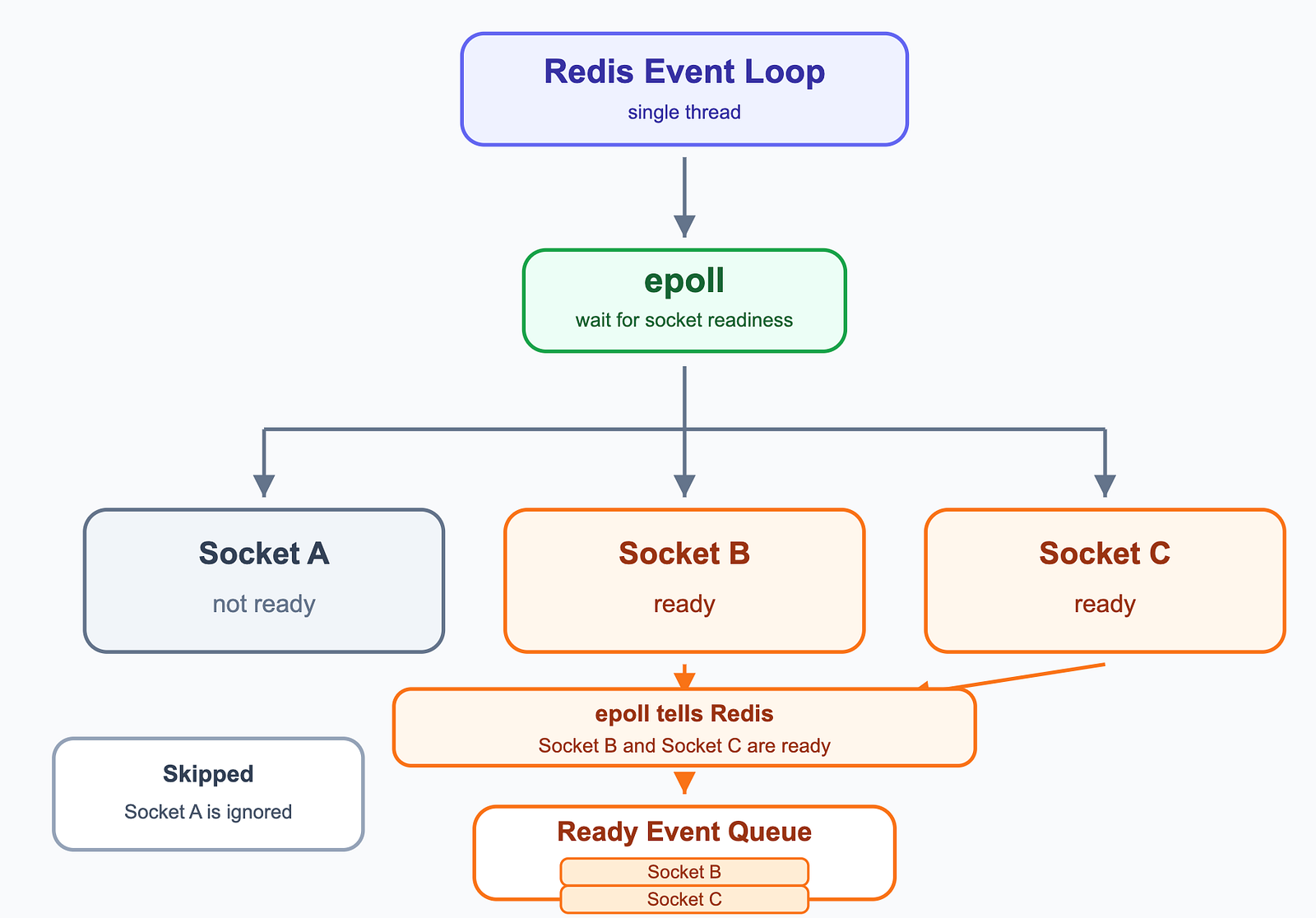
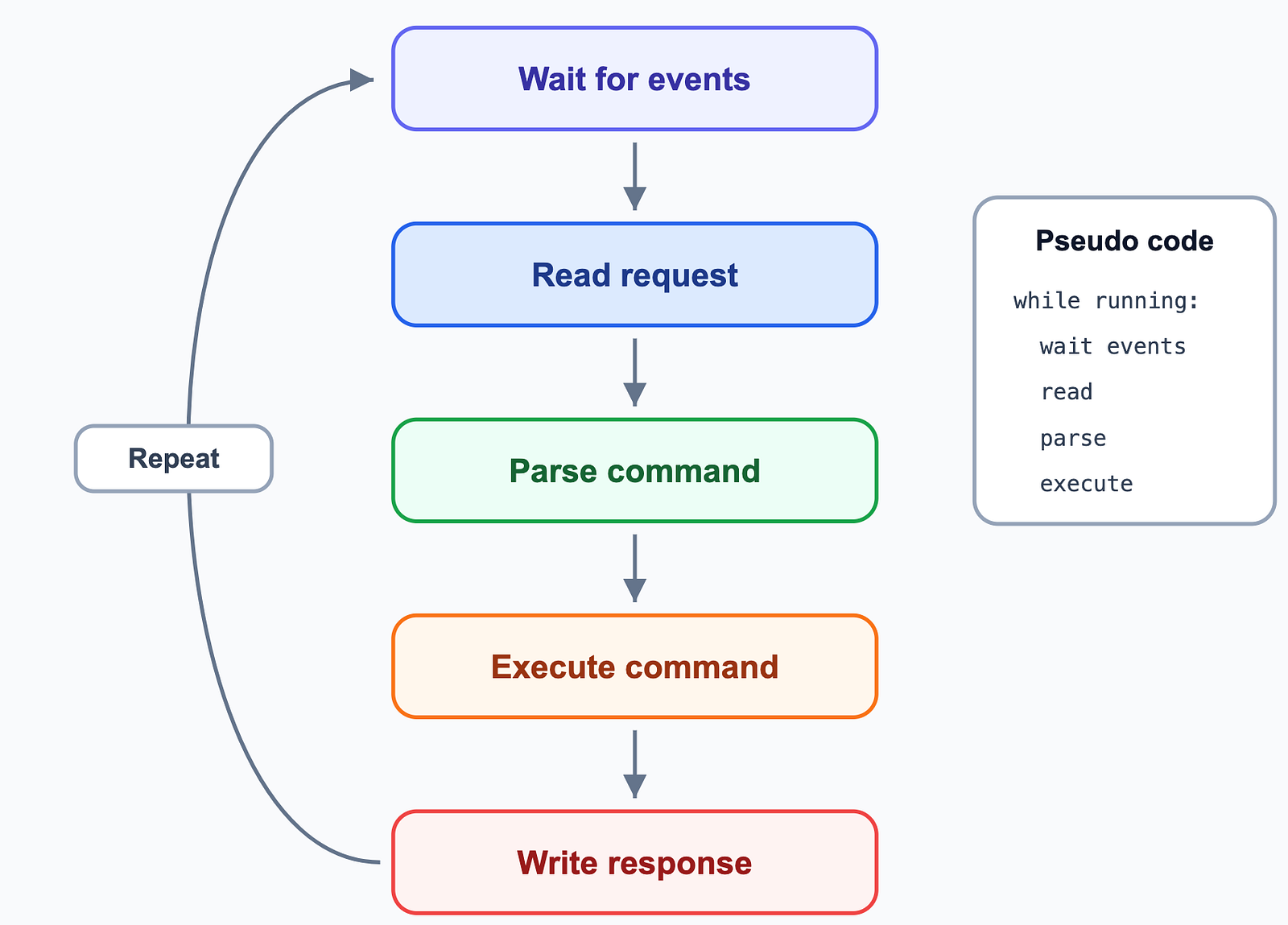
The event loop is like an infinite loop that waits for events, handles ready clients, and repeats.
4 Redis Persistence
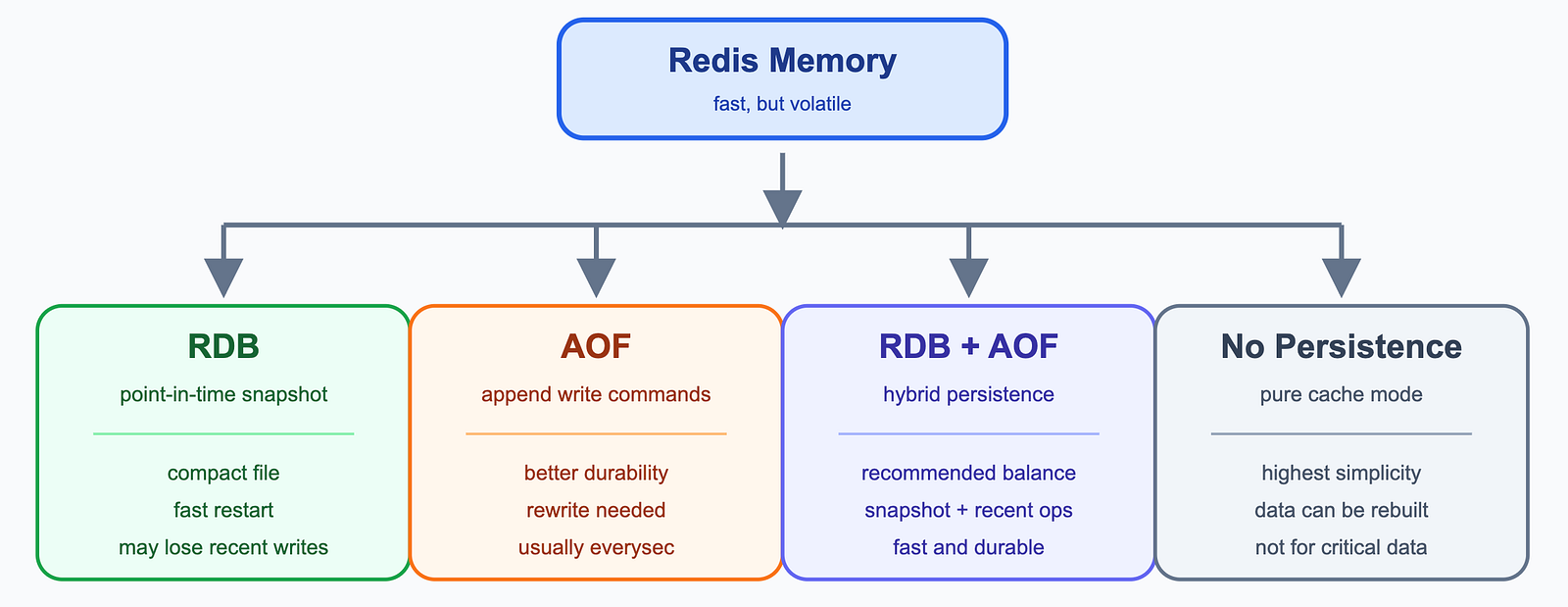
Redis stores data in memory, so it is very fast. But memory is volatile: if the process exits or the server crashes, data in memory can disappear. Persistence is Redis’s way of saving data to disk so it can recover after restart.
Redis officially supports several persistence choices:
- RDB: point-in-time snapshots.
- AOF: append-only command log.
- RDB + AOF: hybrid persistence.
- No persistence: pure cache mode.
4.1 RDB Snapshot
RDB saves Redis data as a compact snapshot file. You can think of it as taking a photo of Redis memory at a certain moment.
Redis can create RDB snapshots in the background with bgsave. The parent process continues serving clients, while a child process writes the snapshot file to disk.

RDB is good for backups and fast restart. But if Redis crashes after the last snapshot, writes after that snapshot may be lost.
4.2 AOF(Append Only File)
AOF records write commands. When Redis restarts, it replays these commands to rebuild data.
Common AOF fsync policies:
always: sync every write to disk. Best durability, worst performance.everysec: sync about once per second. Good balance and commonly used.no: let the operating system decide. Better performance, weaker durability.

Since Redis 7.0, AOF uses a multi-part design: base AOF file, incremental AOF files, and a manifest file. This makes rewrite and recovery management cleaner.
4.3 AOF Rewrite
AOF keeps appending commands, so the file can grow large. Redis can rewrite AOF to make it smaller.
After rewrite, Redis does not need to keep all old increments. It can save the final state more compactly.
4.4 RDB + AOF
For many production systems, using AOF with RDB is a practical choice. RDB gives compact snapshots and fast recovery. AOF records recent writes and reduces data loss.
If both RDB and AOF are enabled, Redis uses AOF for recovery because it is usually more complete.
4.5 How to Choose
If Redis is only a cache and data can be rebuilt from MySQL or another database, you may disable persistence or use only RDB.
If you care about data durability, enable AOF, usually with appendfsync everysec.

5 Redis Expiration and Key Eviction
Redis is fast because it stores data in memory. But memory is expensive and limited, so a cache should not store everything.
A better cache design is to store the most valuable data: hot data, frequently accessed data, or data that can reduce expensive database reads.
For example, if MySQL has 1 TB of data, putting all of it into Redis is usually not cost-effective. In many systems, a small part of the data receives most requests. But this is not always exactly “20% data serves 80% traffic”, so cache size should be decided by real access patterns and cost.
You can set a memory limit with:
CONFIG SET maxmemory 4gb
When memory exceeds maxmemory, Redis uses maxmemory-policy.
5.1 Expiration
https://redis.io/docs/latest/commands/expire/?utm_source=chatgpt.com
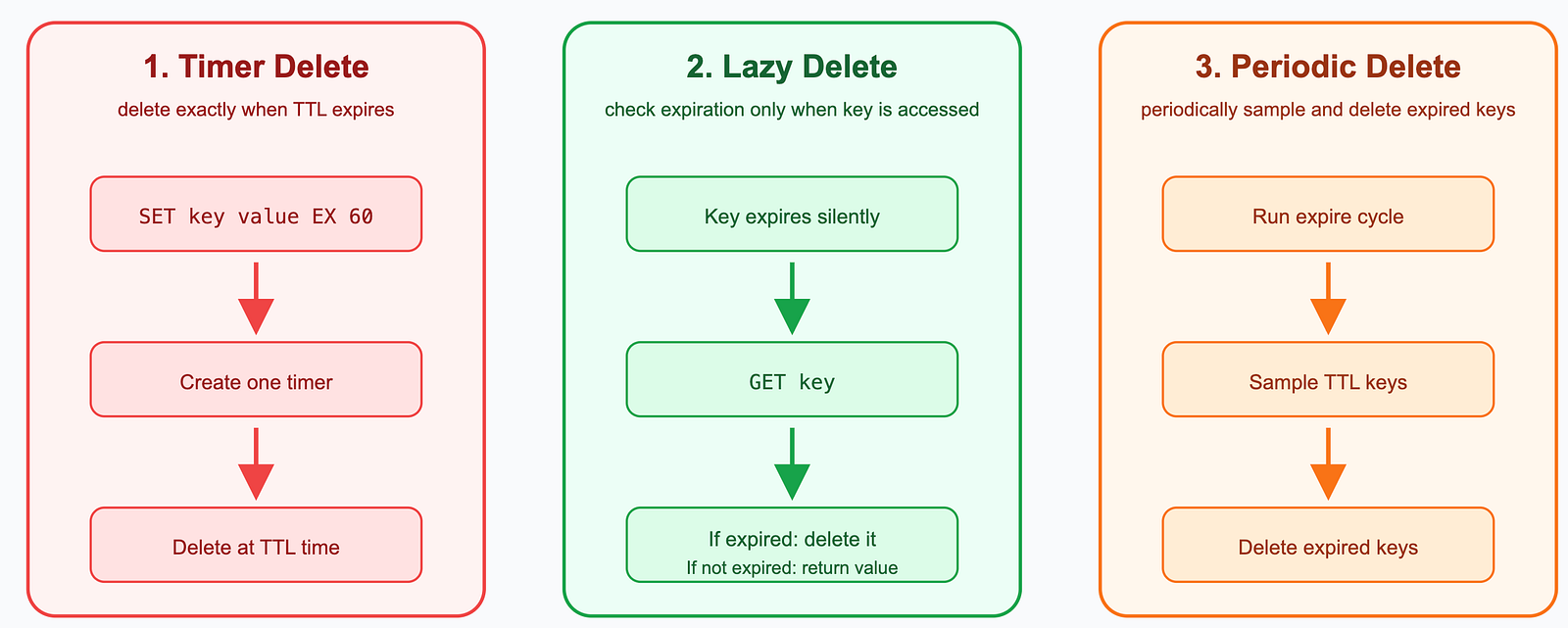
Expiration means a key has a TTL. When time is up, Redis can delete it.
Scheduled Deletion
When a key is assigned an expiration time, Redis creates a timer for it. Once the expiration time is reached, the key is deleted immediately.
(Correction based on the Redis EXPIRE documentation: Redis does not create a separate timer for every key with a TTL, and expiration does not rely on precise scheduled deletion. Redis expires keys in two ways. Passive expiration checks a key when a client accesses it; if the key has timed out, Redis deletes it. Active expiration runs periodically, randomly samples a small number of keys from the set of keys with expiration, and deletes the sampled keys that have already expired. Source: https://redis.io/docs/latest/commands/expire/)
Lazy Deletion
Redis does not delete the expired key immediately. Instead, when the key is accessed, Redis checks whether it has expired.
- If the key has expired, Redis deletes it and returns
nil. - If the key has not expired, Redis returns the value.
Periodic(定期)
Redis periodically scans the database and removes expired keys. How many expired keys to delete and how many databases to scan depends on Redis’ internal algorithm.
5.2 Eviction
https://redis.io/docs/latest/develop/reference/eviction/?utm_source=chatgpt.com
Eviction means Redis memory is full. Redis must remove some keys to make room for new data.
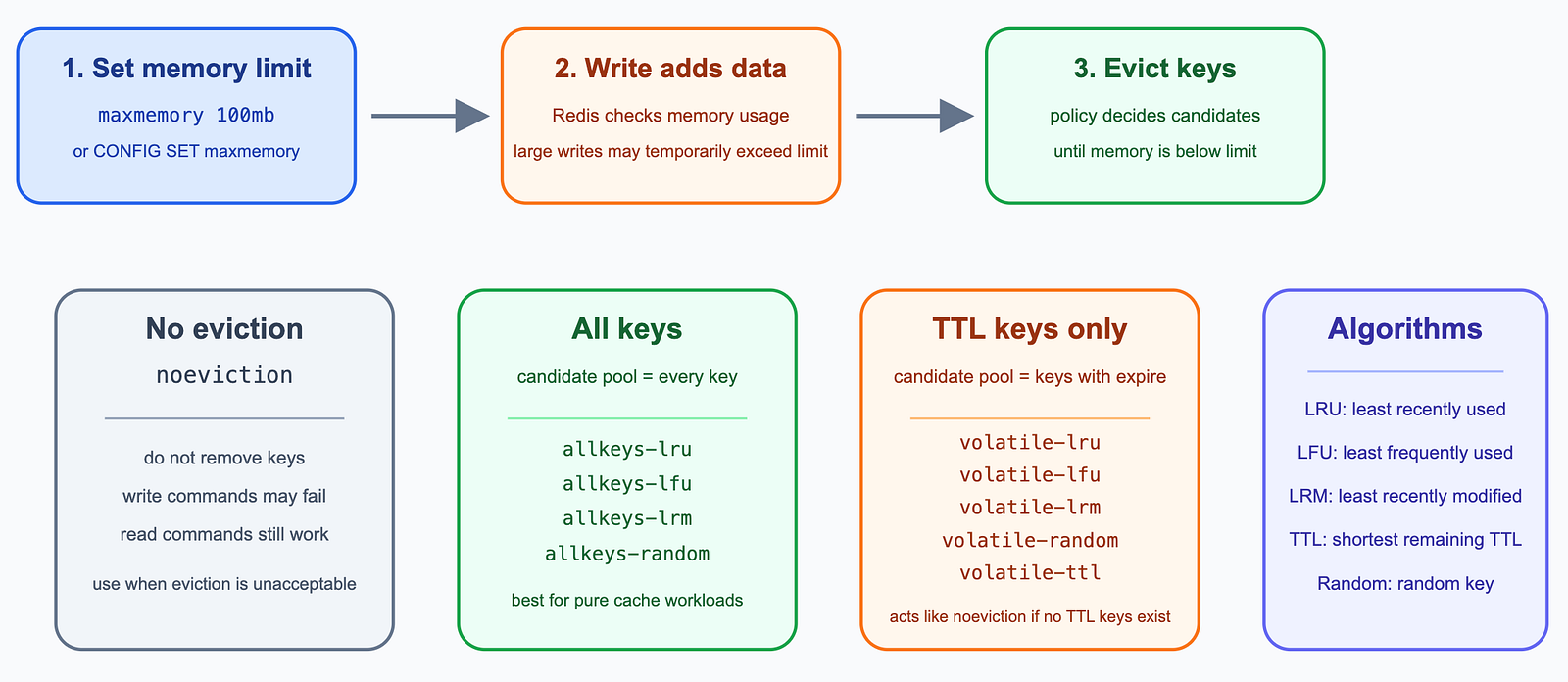
noeviction
Keys are not evicted but the server will return an error when you try to execute commands that cache new data.
Evict Only Keys with TTL
These policies only choose keys that have an expiration time.
volatile-lru: Evict the least recently used keys that have an associated expiration (TTL).volatile-lrm: Evict the least recently modified keys that have an associated expiration (TTL).volatile-lfu: Evict the least frequently used keys that have an associated expiration (TTL).volatile-random: Evicts random keys that have an associated expiration (TTL).volatile-ttl: Evict keys with an associated expiration (TTL) that have the shortest remaining TTL value.
Evict from All Keys
These policies choose from all keys, whether they have TTL or not.
allkeys-lru: Evict the least recently used (LRU) keys.allkeys-lrm: Evict the least recently modified (LRM) keys.allkeys-lfu: Evict the least frequently used (LFU) keys.allkeys-random: Evict keys at random.
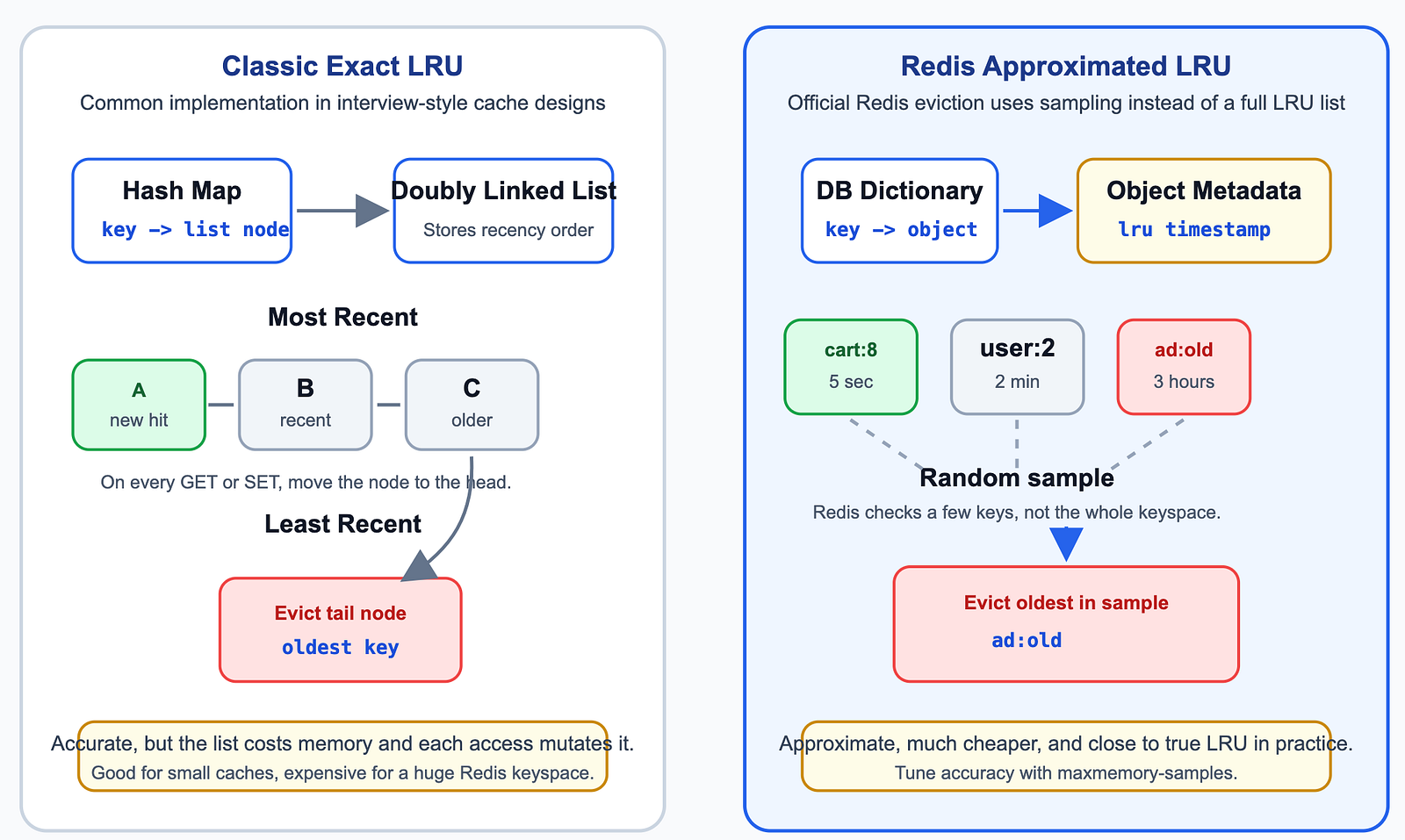
LRU(Least Recently Used)
Redis does not maintain a perfect global LRU or LFU list. Instead, Redis uses sampling. It randomly samples a small number of keys, then evicts the worst candidate.
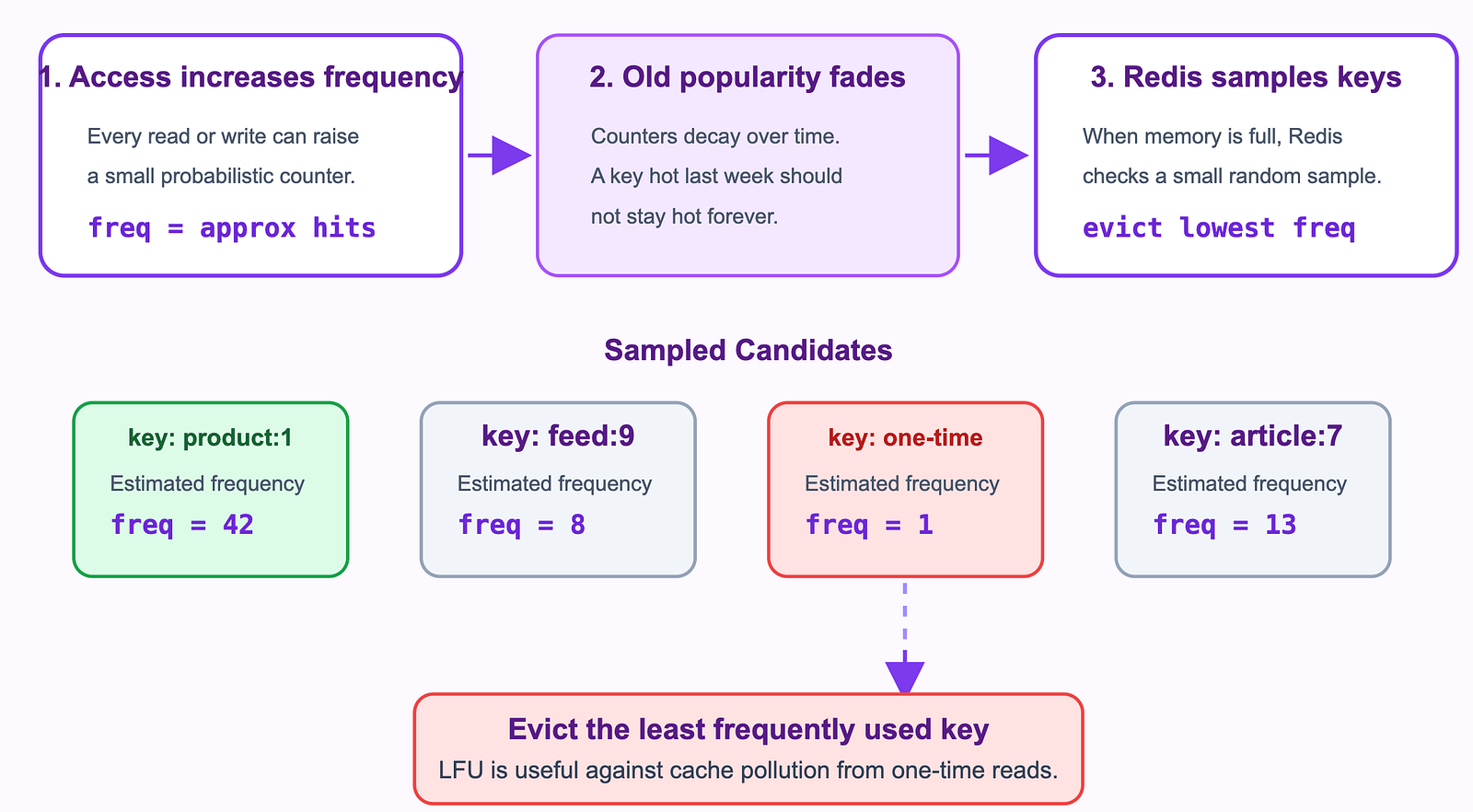
LFU(Least Frequently used)
Redis uses an approximate LFU algorithm. It tracks access frequency with a small counter, which gradually decays over time(计数器会随时间衰减,避免历史热点永久占据缓存) to adapt to changing access patterns.
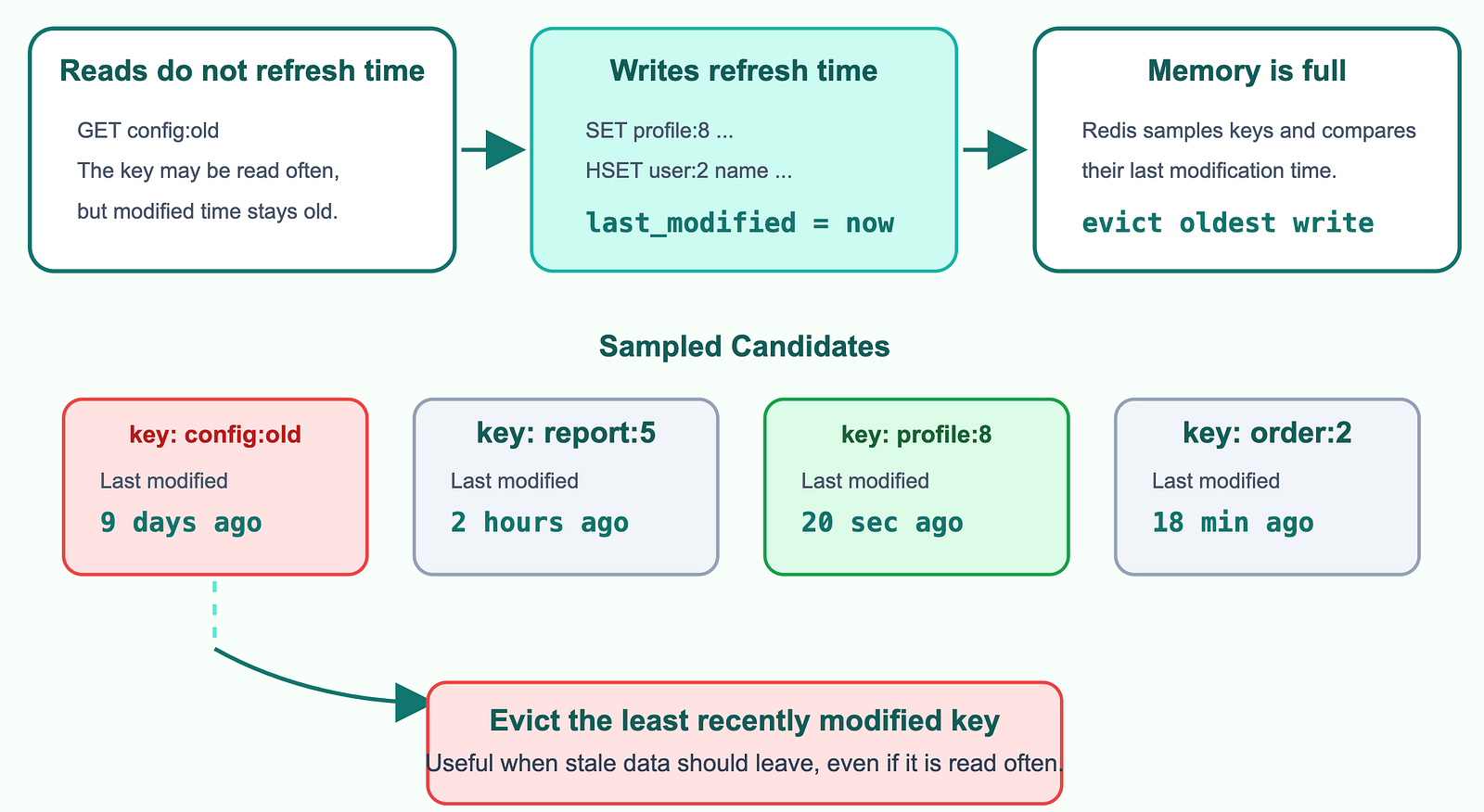
LRM (Least Recently Modified)
LRM updates the timestamp only on write operations, making it ideal for evicting keys that have not been modified for a long time, even if they are frequently read.
6 Cache-Database Inconsistency
6.1 What is data inconsistency
- If a key exists in the cache, its value must match the database.
- If a key does not exist in the cache, the database must contain the latest value.
Otherwise, the cache and the database are considered inconsistent.
update or delete operations
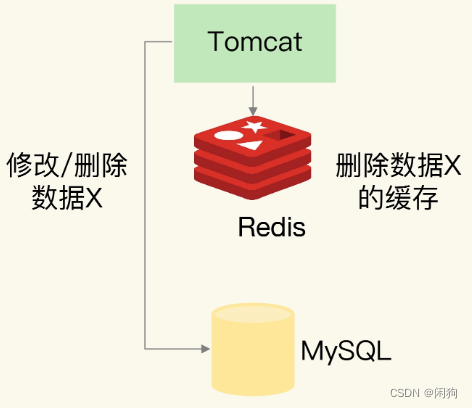
When updating or deleting data, the application must update the database and delete the corresponding cache. If these two operations are not performed together, the cache and the database may become inconsistent.
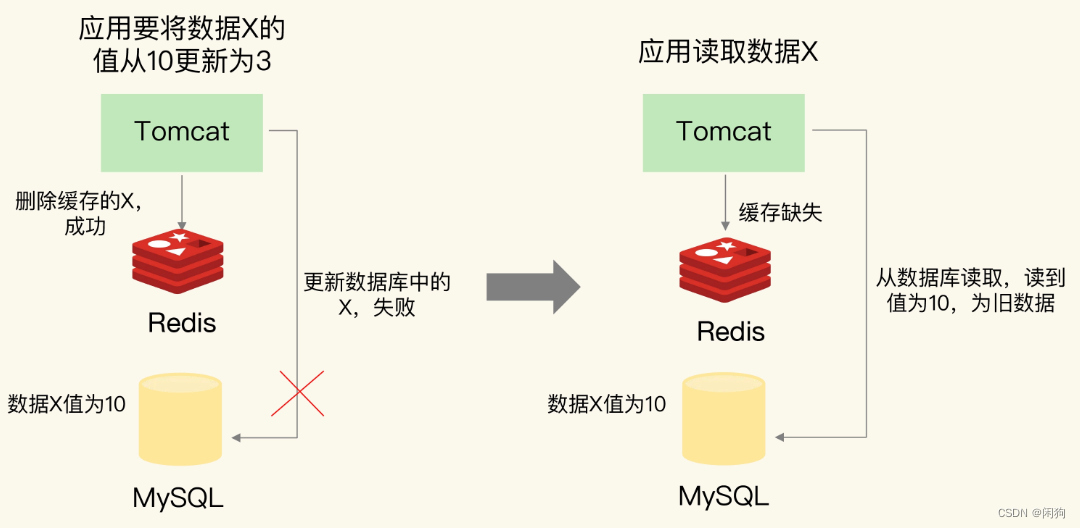
- Delete the Cache First, Then Update the Database
If the cache is deleted successfully but the database update fails, the cache becomes empty while the database still contains the old value. The next request will miss the cache, read the outdated value from the database, and may write that old value back into the cache.
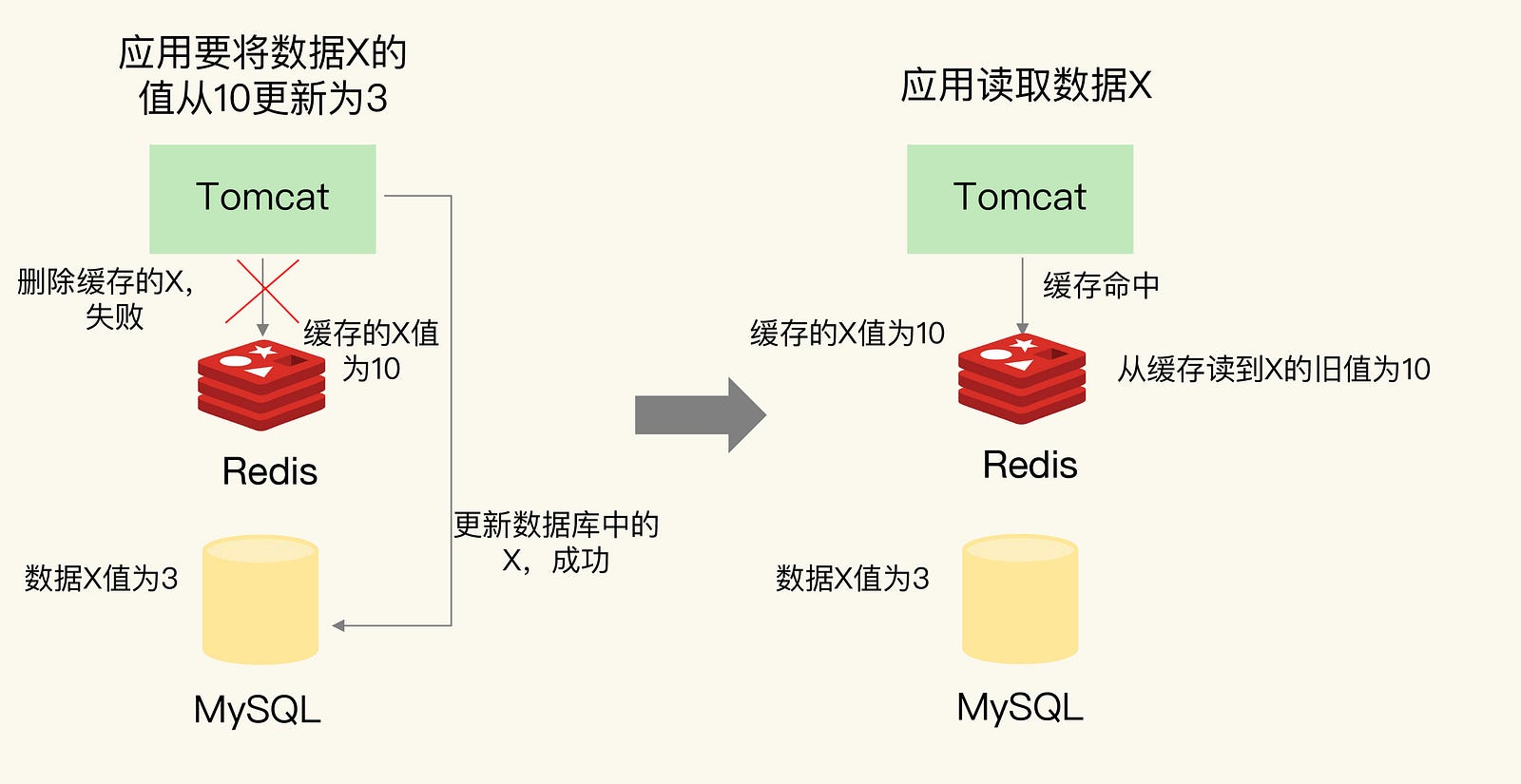
2. Update the Database First, Then Delete the Cache
If the database is updated successfully but deleting the cache fails, the database contains the new value while the cache still holds the old value. Subsequent requests may read the stale value from the cache, resulting in cache-database inconsistency.
6.2 Solving Cache-Database Inconsistency
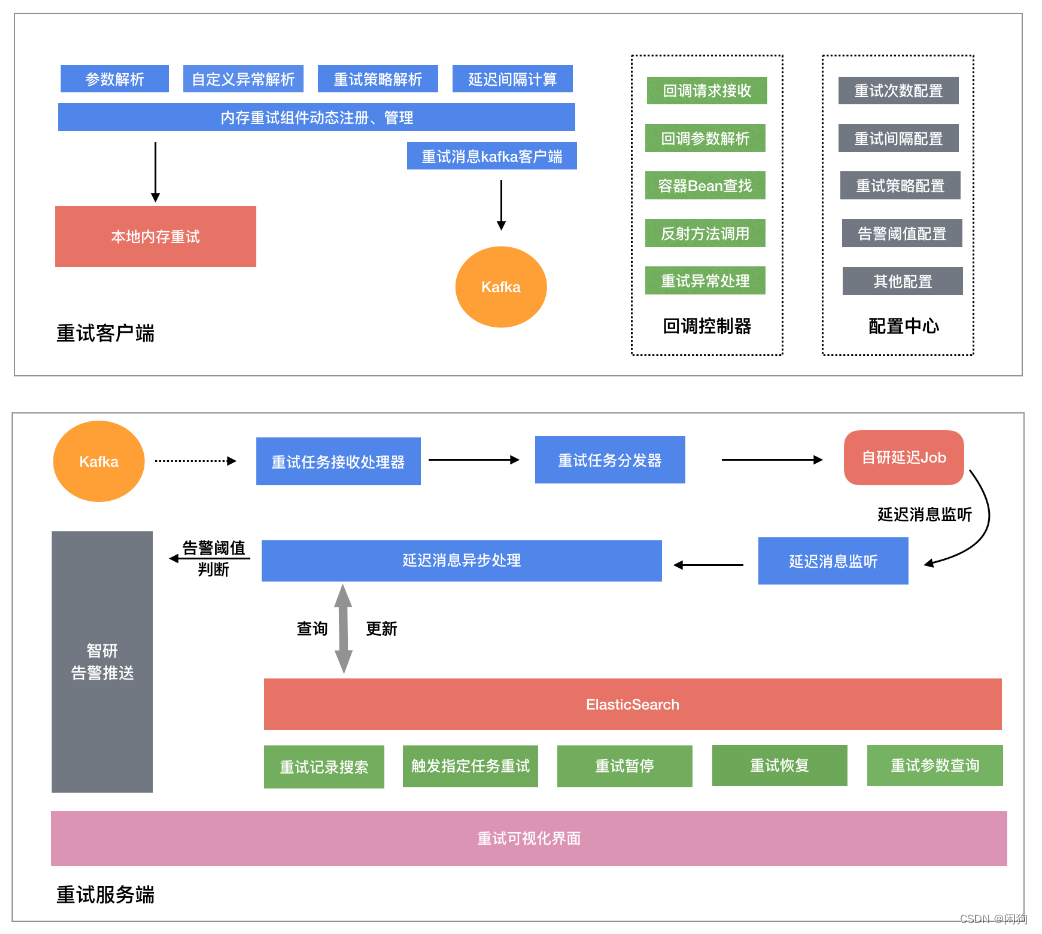
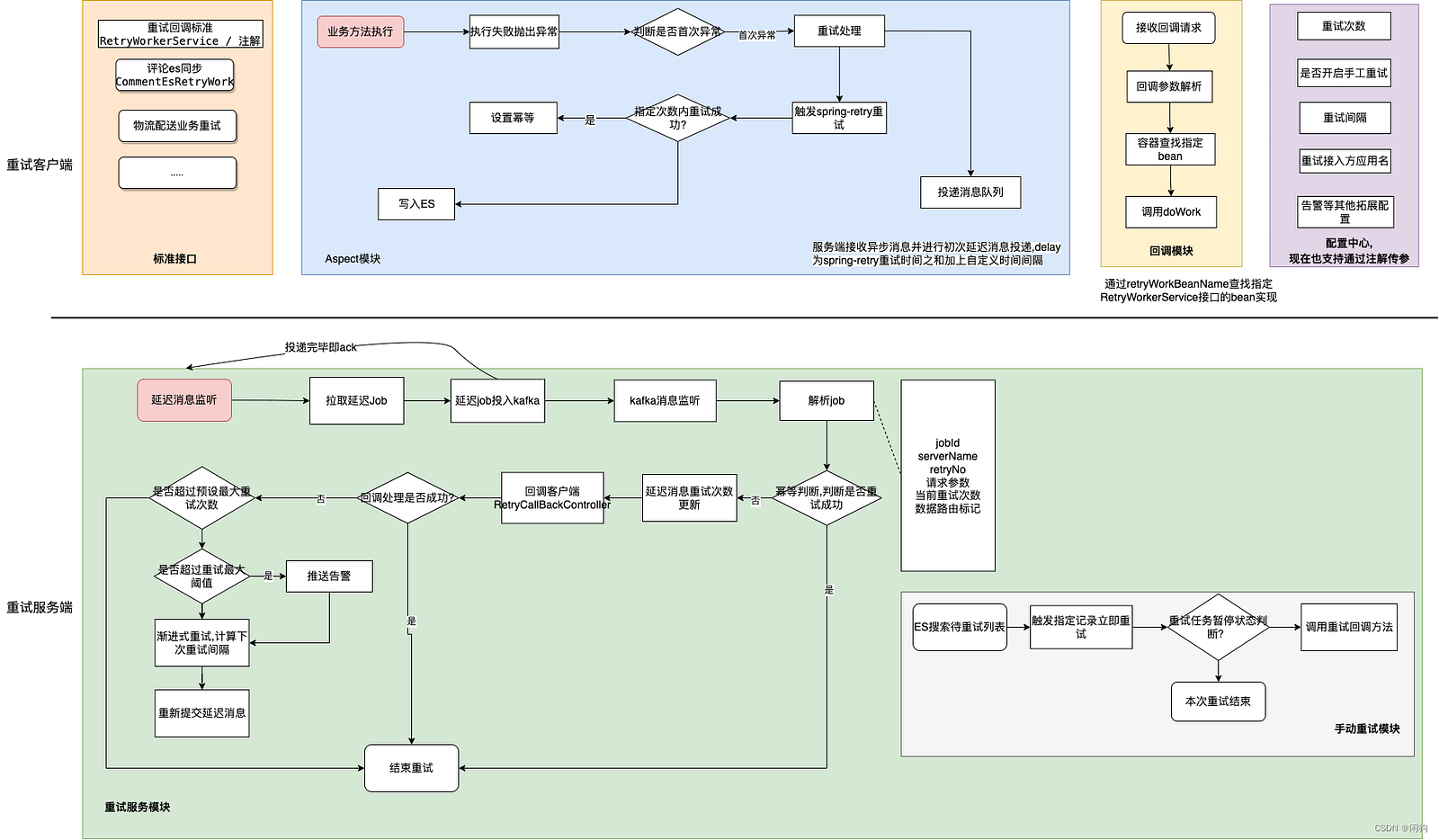
Using a Retry Mechanism to Achieve Eventual Consistency
If updating the cache or the database fails, the application retries the operation using a retry component. The retry interval and maximum retry count can be configured. If all retries fail, the error is reported to the application. This approach helps achieve eventual consistency.
Even if both the database operation and the cache operation eventually succeed, concurrency can still create inconsistent data. The reason is simple: updating the database and touching the cache are two separate operations, so there is always a small time window between them(中间会留下时间窗口).
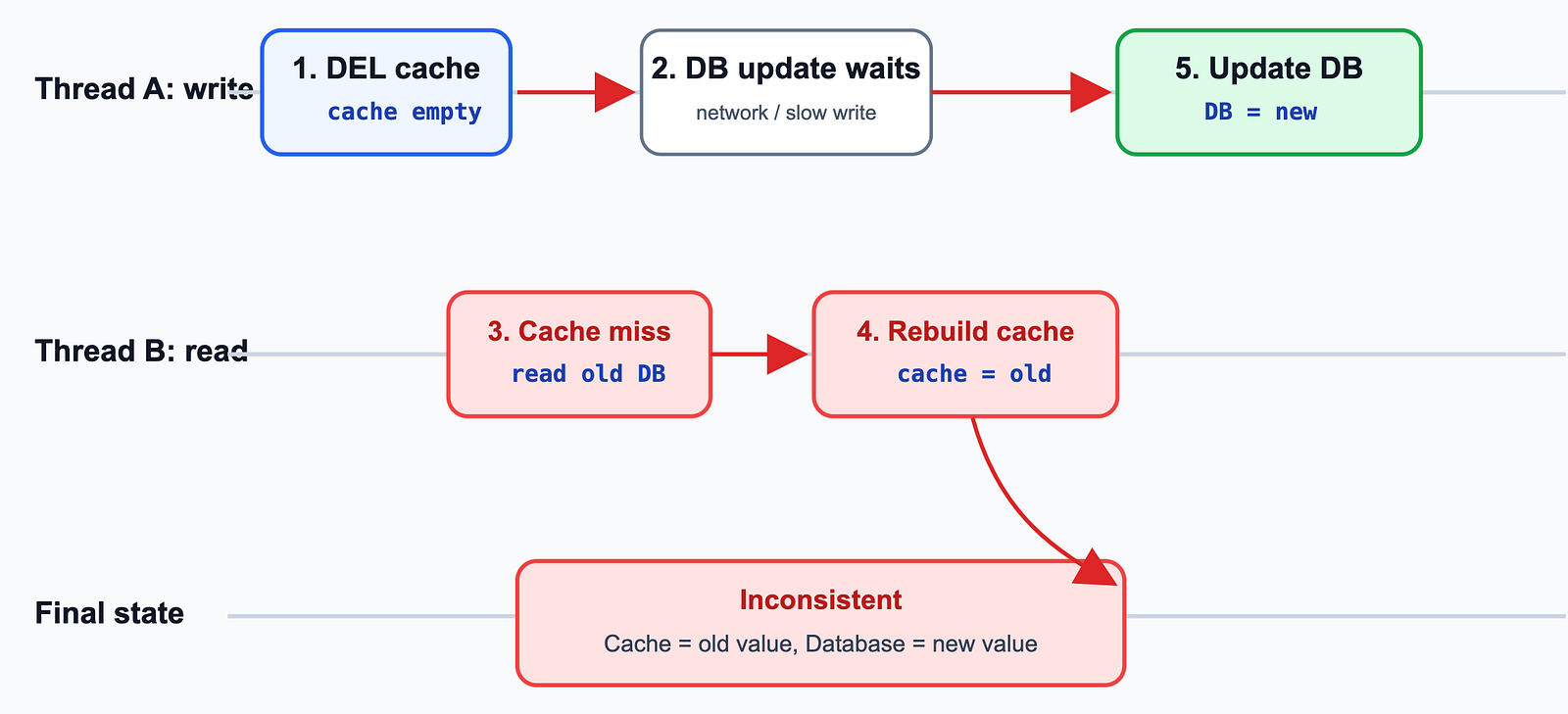
Case 1: delete cache first, then update DB
delete cache first, then update DB. A read request may rebuild the cache with the old database value before the database update finishes.
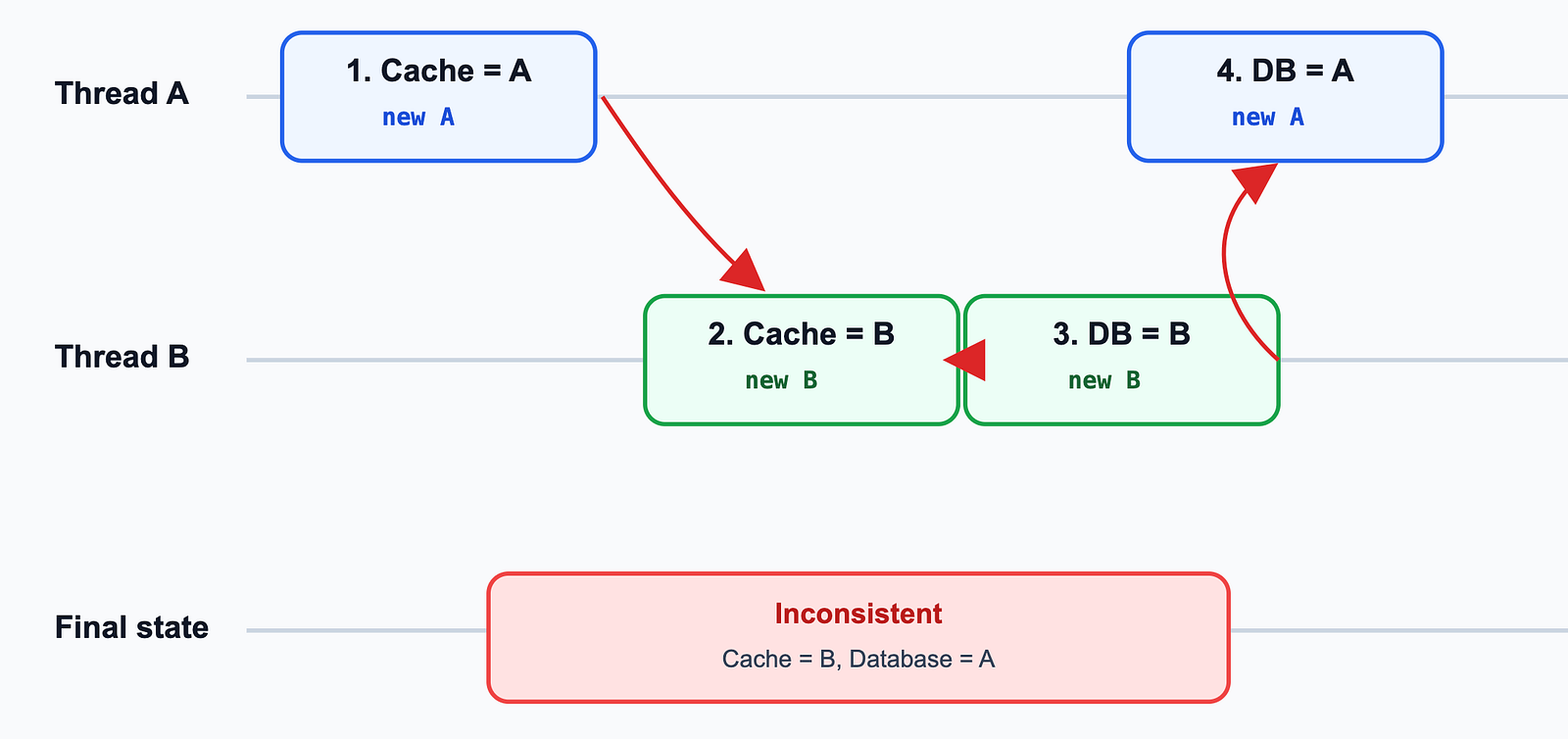
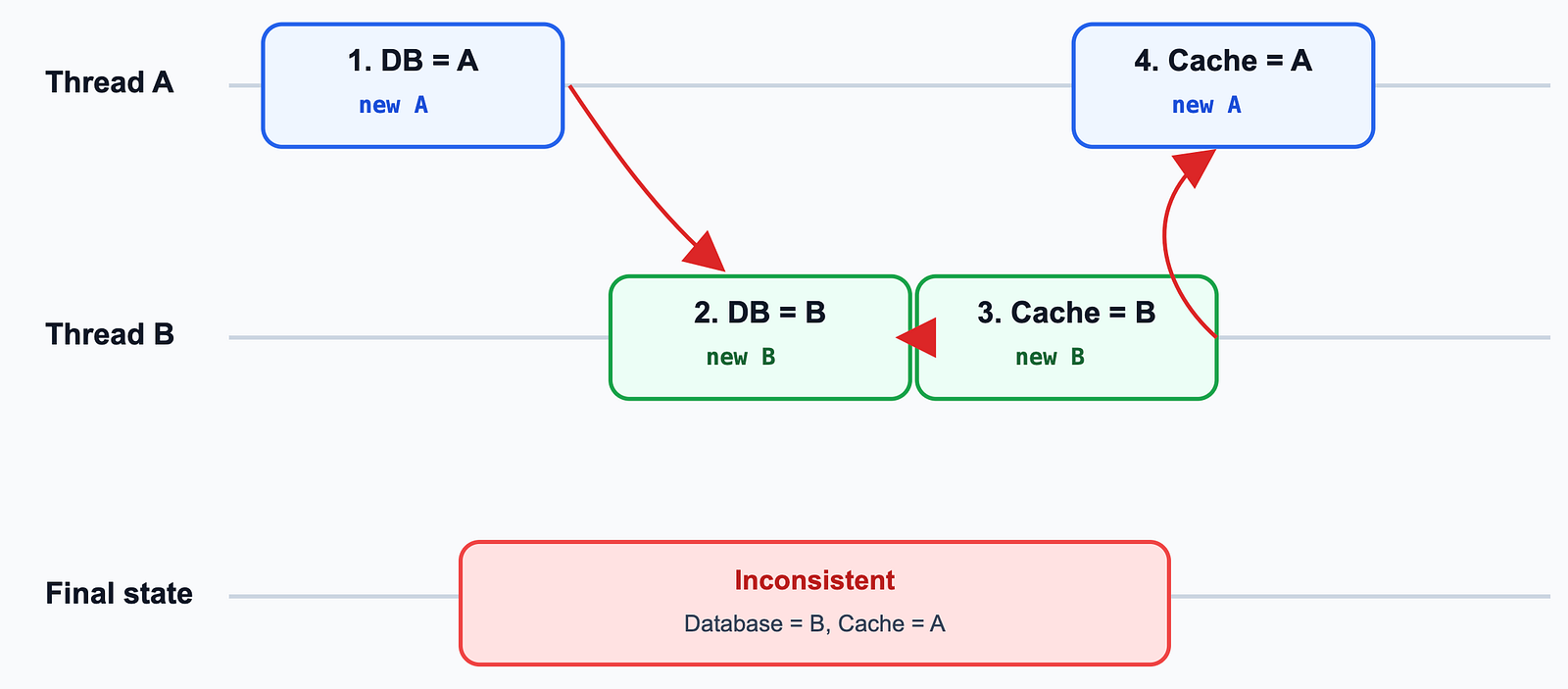
Case 2: update cache first, then update DB
Thread A and Thread B update the same data at the same time. The cache is updated in the order A → B, while the database is updated in the order B → A.
Result: The cache contains Thread B’s value, but the database contains Thread A’s value, causing cache-database inconsistency.
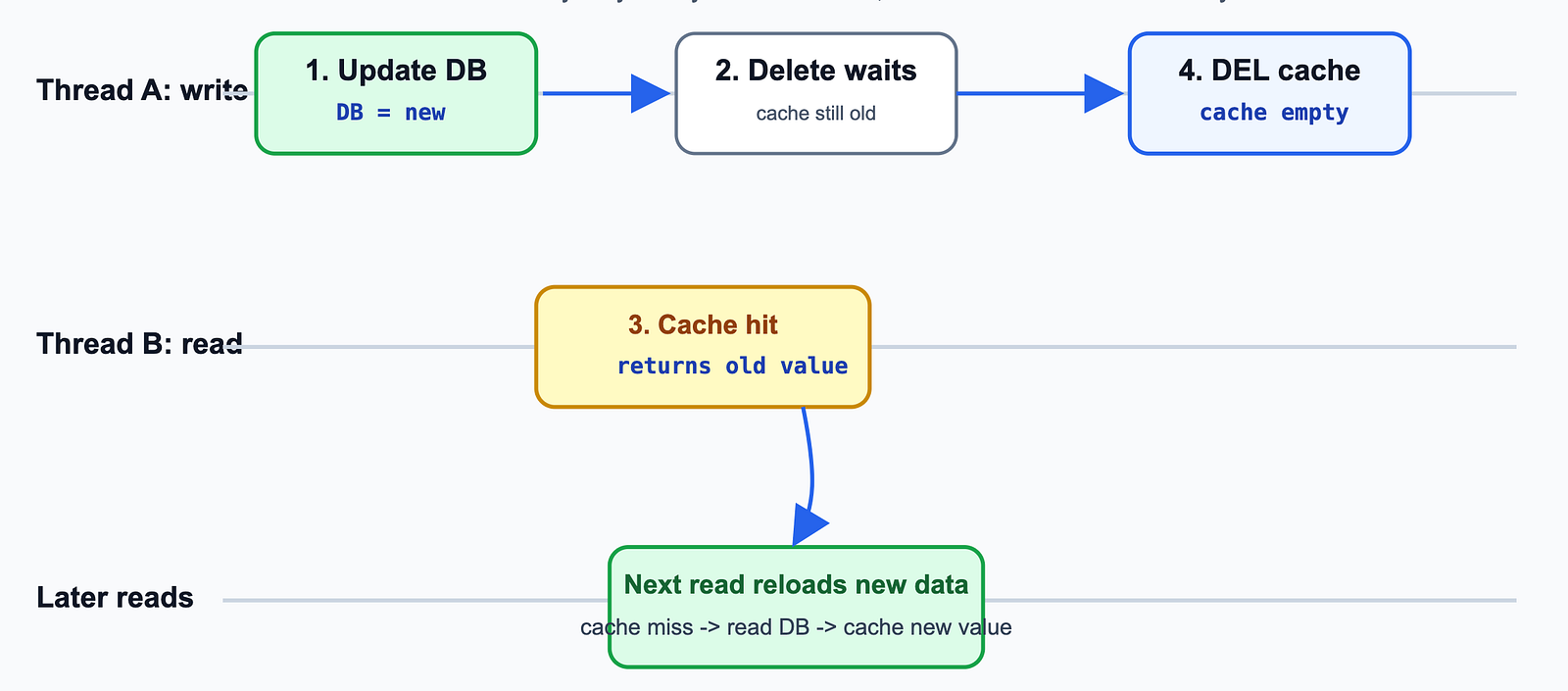
Case 3: update DB first, then delete cache.
A read request may briefly read the old cache value. This is usually a short stale-read window because the cache will be deleted soon.
Case 4: update DB first, then update cache.
Two concurrent writes may again finish in different orders, causing the cache to overwrite the latest value with an older one.
Recommended Approach
Concurrent read-write operations usually cause only temporary stale reads, which are generally acceptable. The real challenge is concurrent writes, as they can leave the cache and the database permanently inconsistent.
To prevent this, ensure that only one write operation can modify the same resource at a time. This can be achieved by using a distributed lock or by serializing writes based on the key.
6.3 How to Keep Shopping Cart Data Consistent
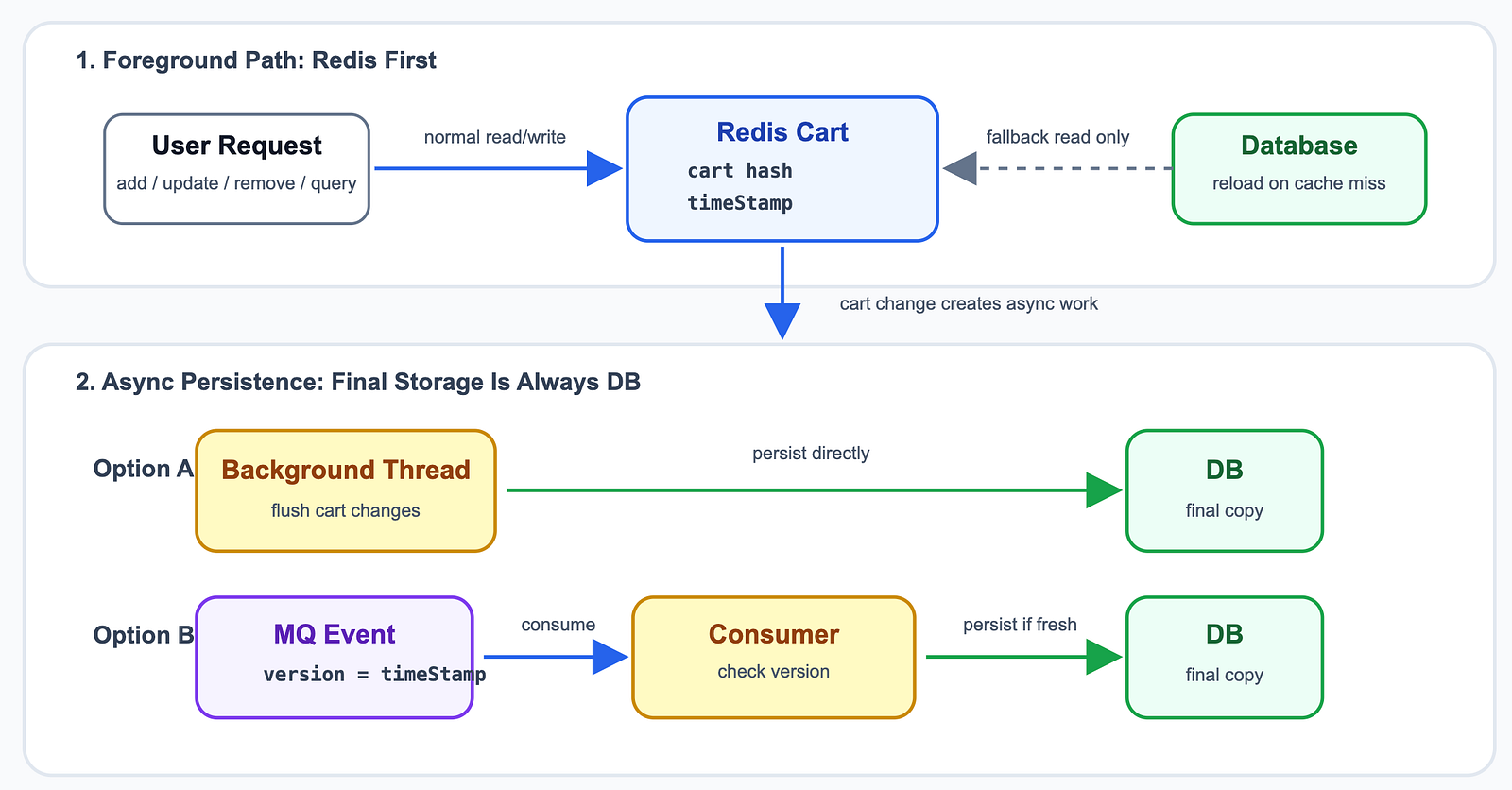
shopping cart is a good use case for Redis because cart operations are frequent: add item, update quantity, remove item, and query cart.
Since losing shopping cart data usually has a relatively small business impact, many systems persist cart data asynchronously. There are two common approaches:
- Persist cart data with a background thread.
- Send cart change events to MQ and let consumers persist them asynchronously.
The risk is out-of-order MQ consumption. A later user action may be consumed before an earlier one, and an old message may overwrite the latest cart state in the database.
Solution: Use a Timestamp or Version
Store a timestamp (or version) in the Redis Hash. Whenever the shopping cart is updated, update this value and include it in the MQ message.
Before writing to the database, the consumer compares the versions:
message.timestamp >= current.timestamp→ Write to the database.message.timestamp < current.timestamp→ Discard the outdated message.
7 Common Cache Challenges
7.1 Many Keys Expire at the Same Time
When many Keys expire at once, requests bypass the cache and flood the database(大量请求涌向数据库).
Solution 1: Add Random TTL
Add a small random offset (for example, 1–3 minutes) to the TTL of each key. This prevents many cache entries from expiring at the same time.
Solution 2: Graceful Degradation(服务降级)
- Non-critical data: Return a default value or an error instead of querying the database.
- Critical data: Fall back to the database on a cache miss.
7.2 Redis Becomes Unavailable
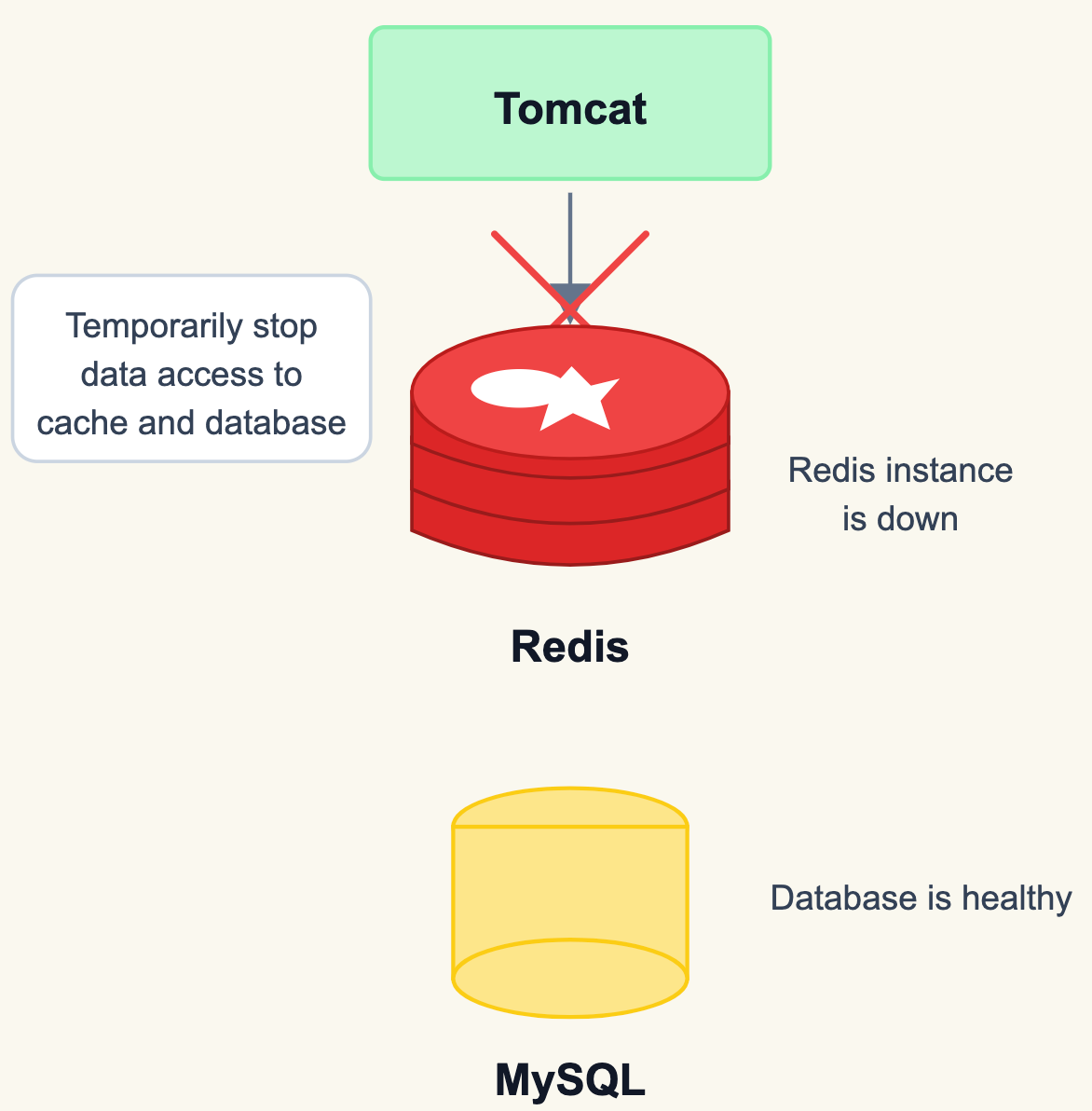
If Redis crashes or becomes unavailable, all requests bypass the cache and hit the database directly.
Solution 1: Circuit Breaker(熔断) or Rate Limiting(限流)
Protect the database by enabling a circuit breaker or rate limiting when Redis is unavailable.
- Circuit Breaker: Temporarily reject cache requests until Redis recovers.
- Rate Limiting: Limit the number of requests allowed to reach the database.
Solution 2: Redis High Availability
Deploy Redis with a primary-replica architecture. If the primary node fails, a replica can take over and continue serving cache requests.
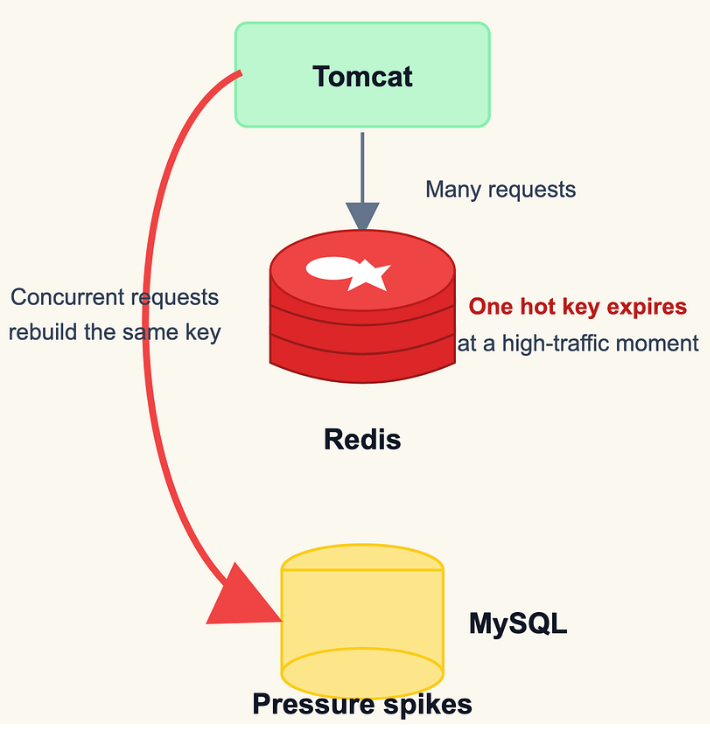
7.3 Hot Key Expiration
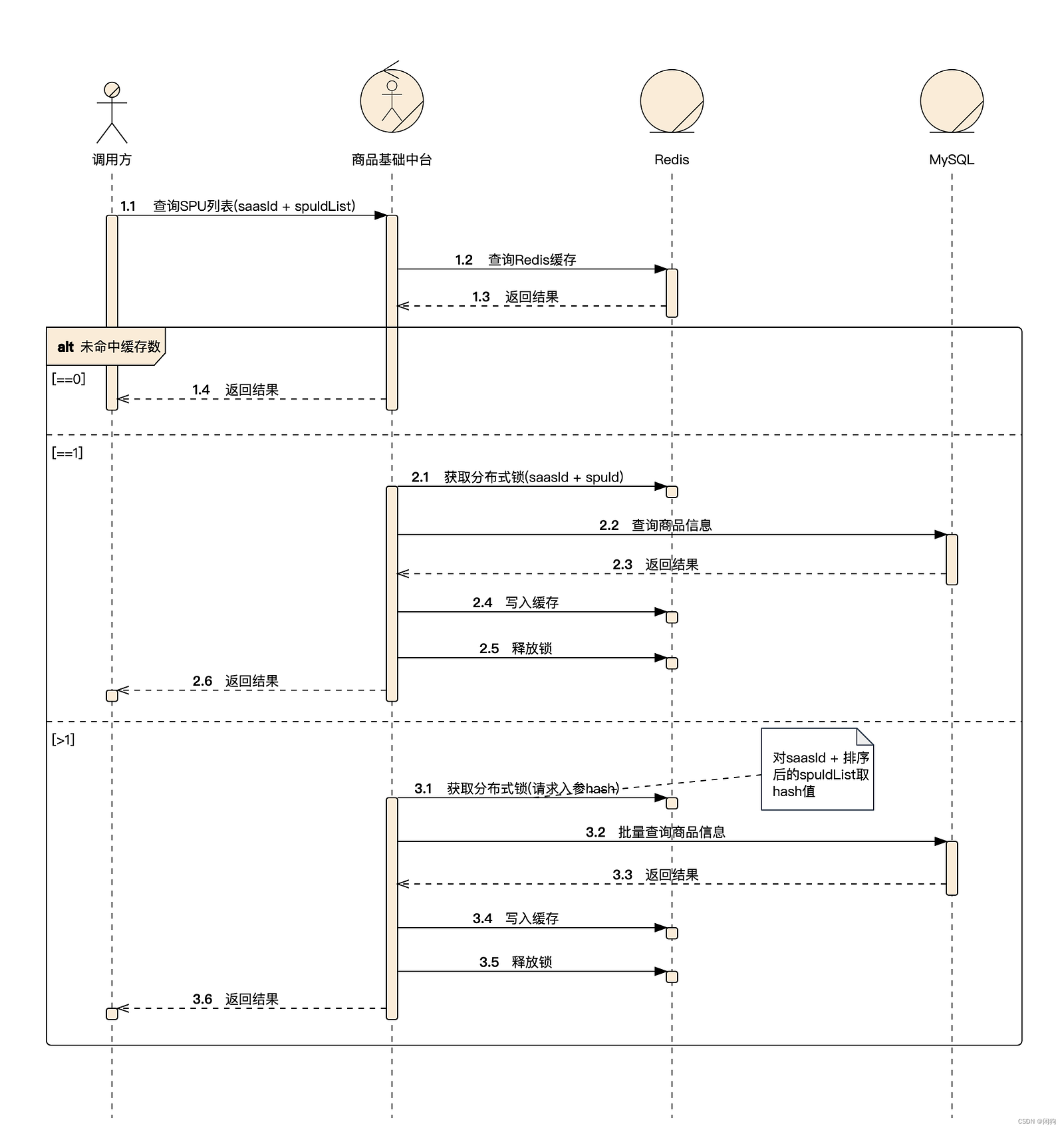
A hot key is a frequently accessed key. If it expires, many requests bypass the cache and hit the database simultaneously, potentially overloading the database.
Solution 1: Do Not Expire Hot Keys
For frequently accessed hot keys, consider not setting an expiration time.
Solution 2: Use a Distributed Lock
Use a distributed lock so that only one request can reload the cache from the database. Other requests wait for the cache to be rebuilt and then read from the cache.
7.4 Requests for Non-existent Data
Requests for non-existent data bypass the cache and hit the database every time, creating unnecessary database load.
Solution 1: Cache Default Values
Cache a null or default value for non-existent data. Future requests can return the cached value directly, preventing repeated database queries.
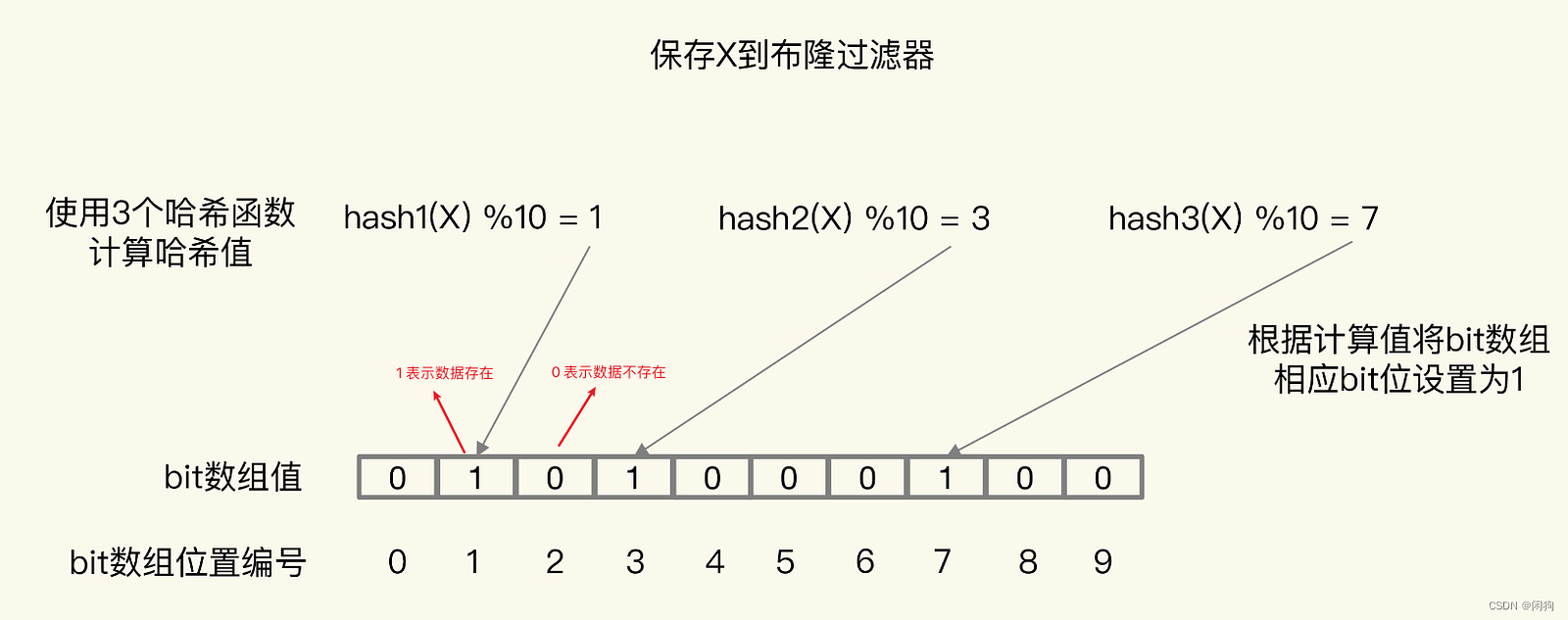
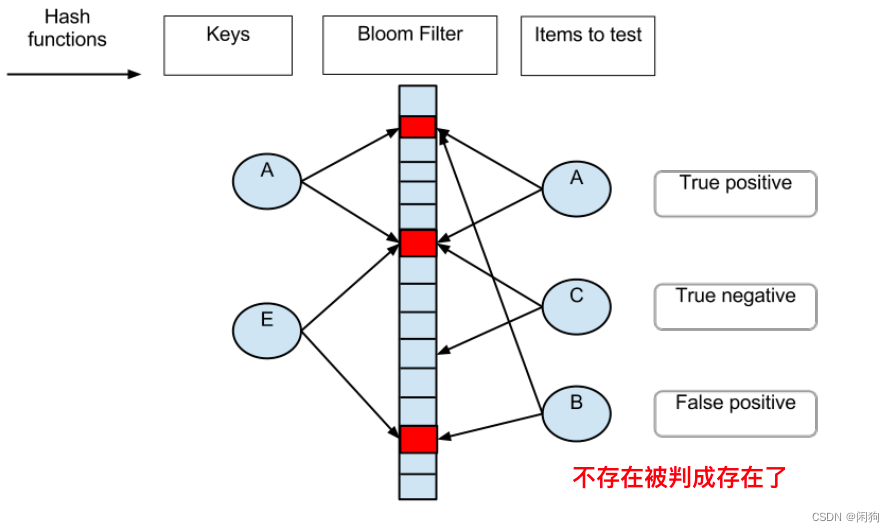
Solution 2: Use a Bloom Filter
Use a Bloom filter to quickly determine whether the requested data may exist before querying Redis or the database.
8 Big Key
https://redis.io/docs/latest/develop/tools/cli/?utm_source=chatgpt.com
Common examples include:
- Popular discussion threads(热门话题下的讨论)
- Celebrity or influencer follower lists(大V的粉丝列表)
- Serialized images or large objects(序列化后的图片)
- Stale data that has not been cleaned up(没有及时处理的垃圾数据)
8.1 Why Are Big Keys a Problem
Big keys can cause several issues:
- Consume excessive memory
- Create data imbalance in a Redis Cluster(在集群中无法均衡)
- Slow down Redis operations and replication(性能下降)
- Block Redis during deletion or key expiration
8.2 How to Find Big Keys
Redis provides several ways to identify big keys.
Method 1: Use redis-cli --bigkeys (Official Recommendation)
The Redis CLI provides the --bigkeys option to scan the dataset and report the largest keys for each data type (String, List, Hash, Set, Sorted Set, Stream, etc.).
redis-cli --bigkeys
This command is easy to use, but it scans the entire dataset, so it may take a long time on large production instances.
Method 2: Analyze an RDB File
Export the RDB file and analyze it with rdbtools. The generated report (CSV) contains the size of each key (size_in_bytes), making it easy to identify big keys by sorting the results.
8.3 How to Handle Big Keys
- Split Large Values
Split a large value into multiple smaller keys. Retrieve them with MGET or Pipeline and combine the results in the application. For very large objects (such as images), store them in object storage or a document database and keep only a reference in Redis.
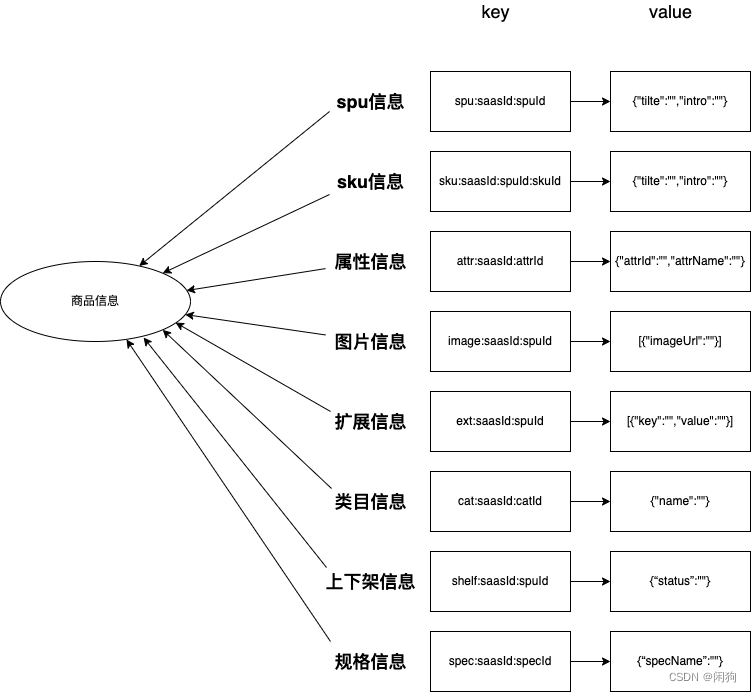
For example, instead of storing all product information in one String:
product:1001
Split it by category:
2. Split Large Collections
If a Hash, List, Set, or Sorted Set contains too many elements, split it into multiple smaller collections.
3. Avoid DEL
Avoid using DEL to remove big keys, as it may block Redis while releasing memory.
4. Use UNLINK
Use UNLINK instead of DEL. It removes the key immediately and frees the memory asynchronously, making the operation non-blocking.
9 High Availability
High availability (HA) is the ability of a system to continue serving requests even when a server fails.
A single Redis instance is a single point of failure. If it becomes unavailable, clients can no longer read or write data until the server recovers.
Redis provides several high-availability solutions, including Replication, Redis Sentinel, and Redis Cluster.

9.1 Replication
https://redis.io/docs/latest/operate/oss_and_stack/management/replication/?utm_source=chatgpt.com
Redis uses Replication to improve availability by keeping one or more replicas synchronized with a primary node.
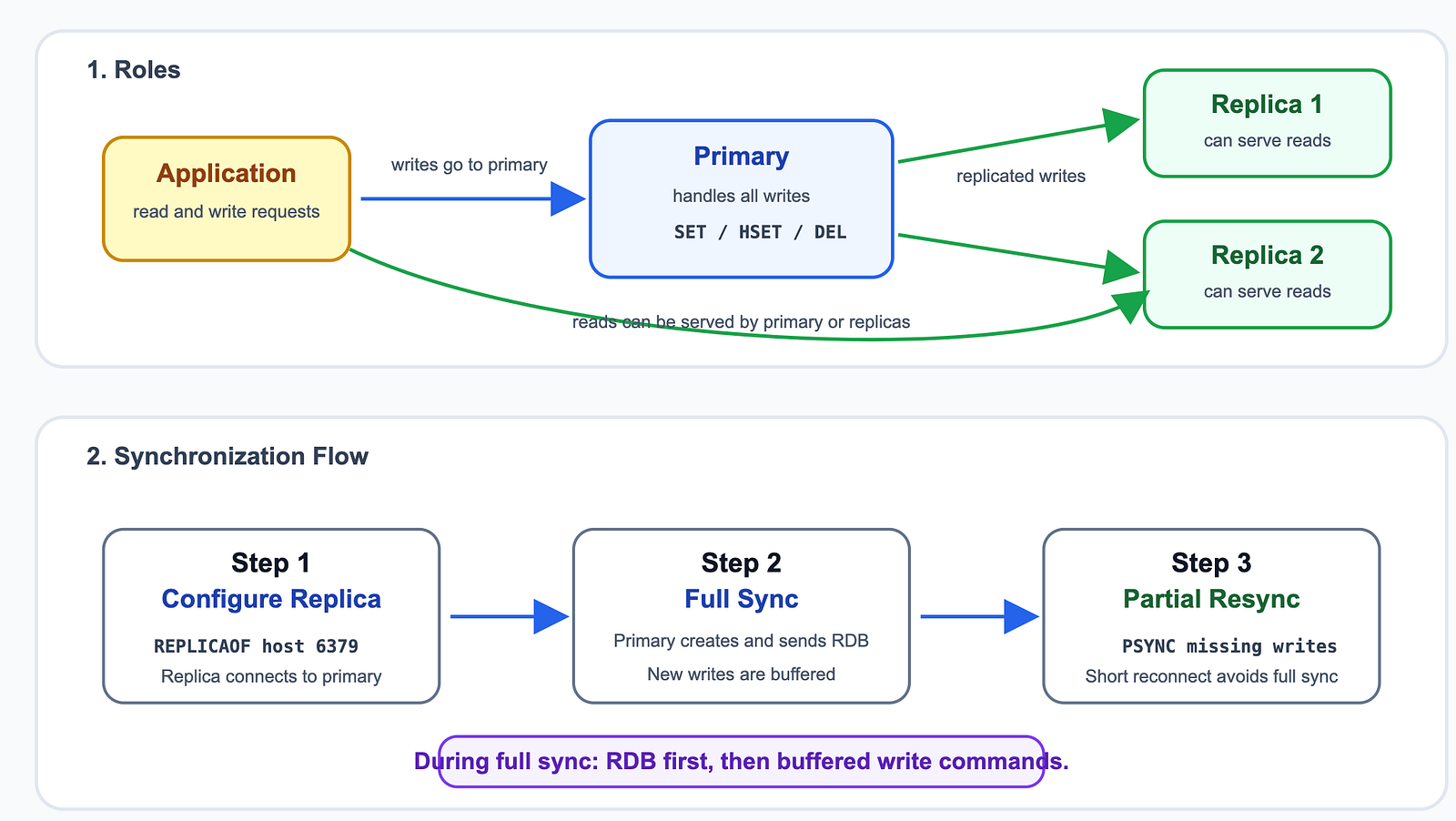
In a replication setup:
- Reads can be served by both the primary and replica nodes.
- Writes are always handled by the primary node and then replicated to the replicas.
This provides:
- High availability
- Read scalability
- Data redundancy
How Replication Works
A replica joins the replication process in three steps:
Step 1: Configure Replication(配置主从关系)
Configure a replica to connect to the primary:
REPLICAOF 172.16.19.3 6379
The replica establishes a TCP connection with the primary and starts the synchronization process.
Step 2: Full Synchronization(全量同步)
If the replica connects for the first time, or cannot perform a partial synchronization, Redis performs a full synchronization.
The primary:
- Creates an RDB snapshot.
- Sends the RDB file to the replica.
- Buffers new write commands while the snapshot is being transferred.
- Sends the buffered commands after the replica finishes loading the RDB.
Step 3: Partial Resynchronization(增量同步)
After the initial synchronization, the primary continuously sends write commands to the replicas.
If the connection is interrupted briefly, Redis uses PSYNC to send only the missing commands instead of transferring the entire dataset again.
9.2 Sentinel
Redis Sentinel provides high availability for Redis Replication.
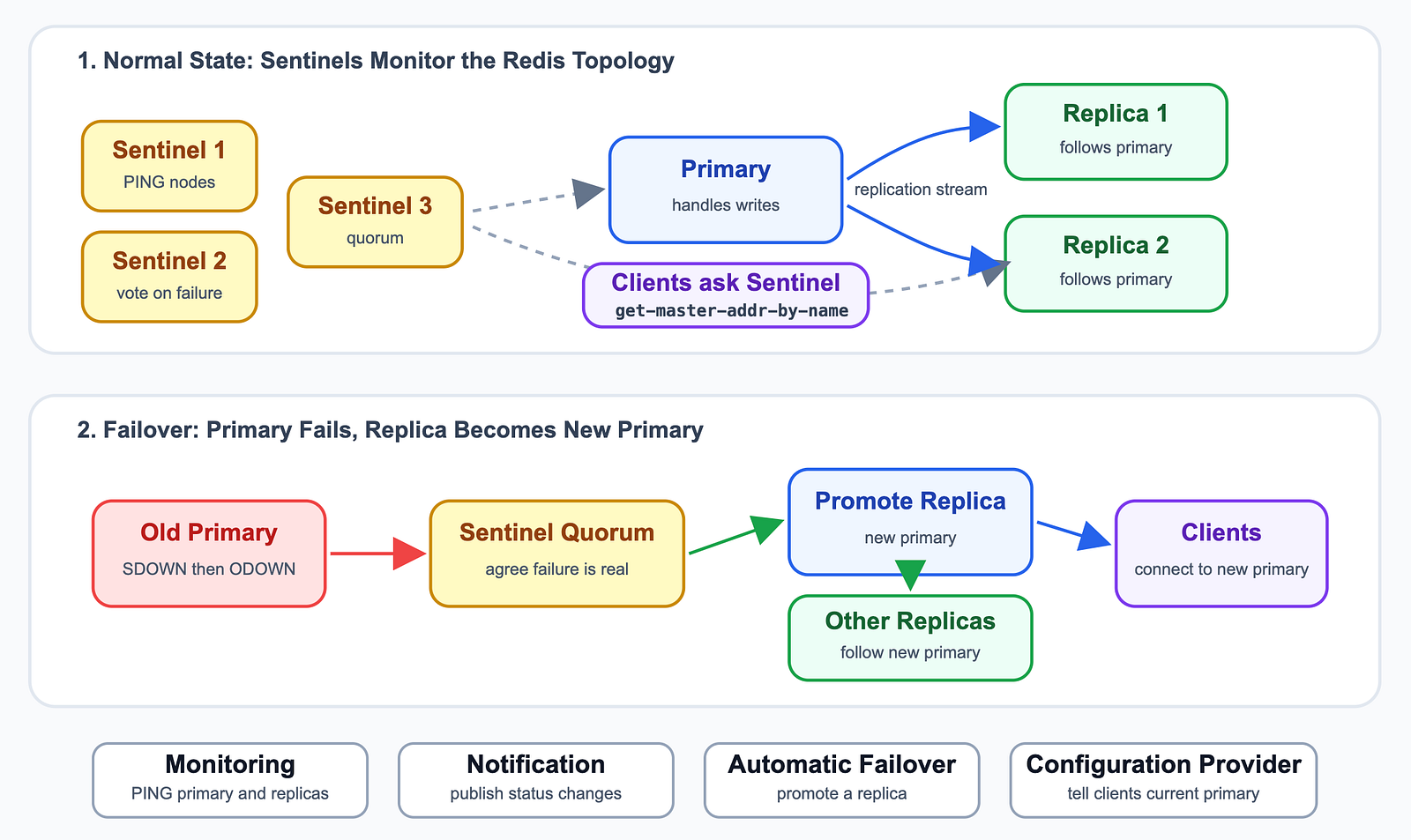
When the primary node fails, Sentinel automatically detects the failure, promotes a replica to become the new primary, and updates the remaining replicas and clients.
Redis Sentinel is responsible for four tasks:
- Monitoring — Continuously monitors the health of primary and replica nodes.
- Notification — Sends notifications when an instance changes status.
- Automatic Failover — Promotes a replica to primary if the current primary fails.
- Configuration Provider — Provides clients with the address of the current primary.
10 Redis Cluster
Redis Cluster provides both data sharding and high availability.
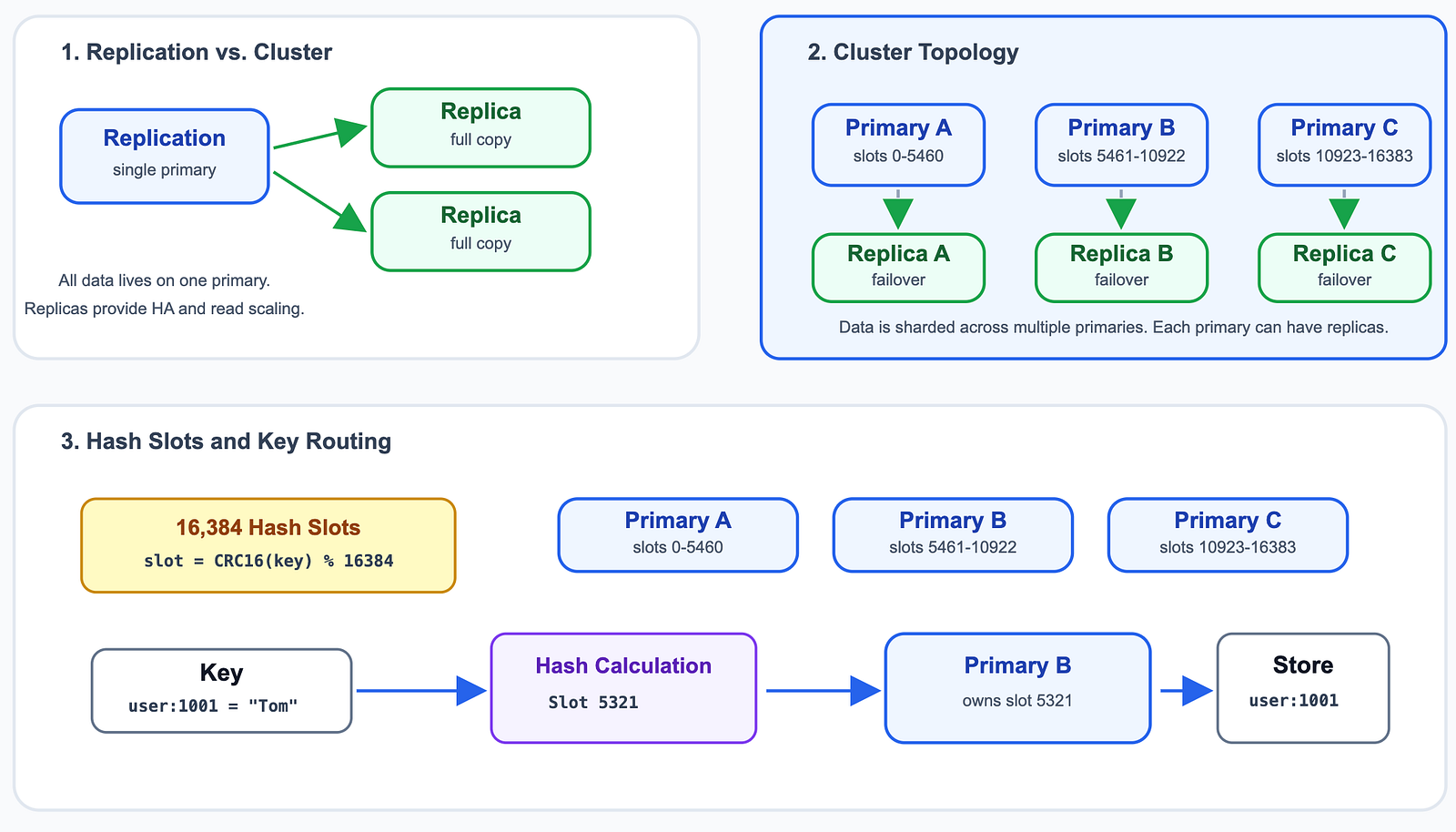
Instead of storing all data on a single server, Redis Cluster distributes data across multiple primary nodes. Each primary can have one or more replicas for failover.
10.1 Replication vs. Redis Cluster
Redis Replication uses a single primary and one or more replicas. All data is stored on the primary, while replicas keep complete copies of the dataset. It provides high availability and read scaling.
Redis Cluster uses multiple primary nodes. Data is distributed across these nodes using 16,384 hash slots, and each primary can have one or more replicas. It provides data sharding and high availability.
10.2 Hash Slots
Redis Cluster does not use consistent hashing.
Instead, it divides the key space into 16,384 hash slots. Each key is assigned to a hash slot using:
CRC16(key) % 16384
Redis then stores the entire key-value pair on the primary node responsible for that hash slot.
16384 Hash Slots
      0 ─────── 5460      → Primary A
   5461 ───── 10922      → Primary B
 10923 ───── 16383      → Primary C
Example:
SET user:1001 "Tom"
user:1001
      │
      ▼
CRC16(key) % 16384
      │
      ▼
   Slot 5321
      │
      ▼
   Primary B
      │
      ▼
Store: user:1001 → "Tom"
10.3 High Availability
Redis Cluster provides both data sharding and high availability.
Instead of storing all data on a single server, Redis Cluster distributes data across multiple primary nodes. Each primary can have one or more replicas for failover.